> ## Documentation Index
> Fetch the complete documentation index at: https://docs.replit.com/llms.txt
> Use this file to discover all available pages before exploring further.

# Ajouter du contexte

> Donnez à Replit les fichiers, sources, outils connectés et travaux existants pertinents pour comprendre une Conversation.

export const IntegrationsCardVisual = () => <CardScene>
    <div style={{
  position: "relative",
  width: 132,
  height: 100
}}>
      <Panel style={{
  position: "absolute",
  left: 41,
  top: 26,
  width: 50,
  height: 50,
  display: "grid",
  placeItems: "center"
}}>
        <DotGrid />
      </Panel>
      {[[0, 4], [86, 4], [43, 75]].map(([left, top]) => <span key={`${left}-${top}`} style={{
  position: "absolute",
  left,
  top,
  width: 30,
  height: 30,
  border: "1px solid rgba(255,255,255,.58)",
  borderRadius: 9,
  background: "rgba(255,255,255,.22)"
}} />)}
    </div>
  </CardScene>;

export const ImportProjectCardVisual = () => <CardScene>
    <div style={{
  display: "flex",
  alignItems: "center",
  gap: 10
}}>
      <Panel style={{
  width: 58,
  height: 70,
  padding: 10
}}>
        {["100%", "73%", "86%"].map(width => <i key={width} style={{
  display: "block",
  width,
  height: 5,
  marginBottom: 8,
  borderRadius: 99,
  background: "rgba(255,255,255,.66)"
}} />)}
      </Panel>
      <span style={{
  width: 20,
  height: 2,
  background: "rgba(255,255,255,.72)"
}} />
      <Panel style={{
  width: 70,
  height: 70,
  padding: 11
}}>
        <div style={{
  display: "grid",
  gridTemplateColumns: "repeat(2, 1fr)",
  gap: 6
}}>
          {Array.from({
  length: 4
}, (_, index) => <i key={index} style={{
  height: 18,
  borderRadius: 4,
  background: "rgba(255,255,255,.55)"
}} />)}
        </div>
      </Panel>
    </div>
  </CardScene>;

export const FigmaCardVisual = () => <CardScene>
    <Panel style={{
  width: 104,
  height: 92,
  display: "grid",
  placeItems: "center"
}}>
      <svg width="45" height="60" viewBox="0 0 24 24" fill="rgba(255,255,255,.88)">
        <path d="M12 12a4 4 0 1 1 8 0 4 4 0 0 1-8 0zM4 20a4 4 0 0 1 4-4h4v4a4 4 0 1 1-8 0zM12 0v8h4a4 4 0 1 0 0-8h-4zM4 4a4 4 0 0 0 4 4h4V0H8a4 4 0 0 0-4 4zM4 12a4 4 0 0 0 4 4h4V8H8a4 4 0 0 0-4 4z" />
      </svg>
    </Panel>
  </CardScene>;

export const FilesCardVisual = () => <CardScene>
    <Panel style={{
  width: 86,
  height: 104,
  padding: 14
}}>
      <div style={{
  display: "grid",
  gap: 9
}}>
        {["76%", "100%", "62%", "86%"].map(width => <i key={width} style={{
  width,
  height: 5,
  borderRadius: 99,
  background: "rgba(255,255,255,.7)"
}} />)}
      </div>
    </Panel>
  </CardScene>;

export const AddContextCover = () => <div className="chat-mkt" role="img" aria-label="File, image, Figma, and Slack context cues around a Replit Conversation prompt" style={{
  margin: "28px 0 42px",
  borderTop: 0,
  paddingTop: 0
}}>
    <div className="chat-use-case-visual" style={{
  aspectRatio: "auto",
  minHeight: "clamp(220px, 34vw, 320px)",
  overflow: "hidden",
  background: "radial-gradient(circle at 50% -18%, rgba(255,255,255,.82), transparent 42%), radial-gradient(circle at 4% 96%, rgba(255,184,146,.48), transparent 38%), linear-gradient(140deg, #ff764d, #ff3c00 60%, #c92d00)"
}}>
      <div aria-hidden="true" style={{
  position: "absolute",
  inset: 0,
  background: "linear-gradient(180deg, rgba(255,255,255,.14), rgba(255,255,255,0) 48%, rgba(111,24,0,.2))"
}} />
      <div aria-hidden="true" style={{
  position: "relative",
  zIndex: 1,
  display: "grid",
  width: "100%",
  minHeight: "inherit",
  placeItems: "center",
  padding: "clamp(12px, 2.5vw, 24px)",
  boxSizing: "border-box"
}}>
        <div style={{
  position: "absolute",
  left: "clamp(12px, 6%, 62px)",
  top: "29%",
  display: "grid",
  width: "clamp(34px, 7vw, 58px)",
  height: "clamp(42px, 9vw, 72px)",
  placeItems: "center",
  border: "1px solid rgba(255,255,255,.58)",
  borderRadius: 13,
  background: "linear-gradient(180deg, rgba(255,255,255,.31), rgba(255,255,255,.12))",
  boxShadow: "0 12px 24px rgba(55,27,18,.16)",
  backdropFilter: "blur(5px)"
}}>
          <div style={{
  position: "relative",
  width: "48%",
  height: "58%",
  border: "1px solid rgba(255,255,255,.86)",
  borderRadius: 4
}}>
            <span style={{
  position: "absolute",
  top: 5,
  left: 4,
  right: 4,
  height: 2,
  borderRadius: 999,
  background: "rgba(255,255,255,.76)"
}} />
            <span style={{
  position: "absolute",
  top: 11,
  left: 4,
  right: 7,
  height: 2,
  borderRadius: 999,
  background: "rgba(255,255,255,.48)"
}} />
          </div>
        </div>

        <div style={{
  position: "absolute",
  left: "clamp(18px, 10%, 88px)",
  bottom: "clamp(18px, 9%, 44px)",
  display: "grid",
  width: "clamp(34px, 7vw, 56px)",
  height: "clamp(34px, 7vw, 56px)",
  placeItems: "center",
  border: "1px solid rgba(255,255,255,.58)",
  borderRadius: 15,
  background: "linear-gradient(180deg, rgba(255,255,255,.31), rgba(255,255,255,.12))",
  boxShadow: "0 12px 24px rgba(55,27,18,.16)",
  backdropFilter: "blur(5px)"
}}>
          <svg aria-hidden="true" viewBox="0 0 24 24" width="55%" fill="rgba(255,255,255,.88)">
            <path d="M12 12a4 4 0 1 1 8 0 4 4 0 0 1-8 0zM4 20a4 4 0 0 1 4-4h4v4a4 4 0 1 1-8 0zM12 0v8h4a4 4 0 1 0 0-8h-4zM4 4a4 4 0 0 0 4 4h4V0H8a4 4 0 0 0-4 4zM4 12a4 4 0 0 0 4 4h4V8H8a4 4 0 0 0-4 4z" />
          </svg>
        </div>

        <div style={{
  position: "absolute",
  right: "clamp(12px, 6%, 62px)",
  top: "20%",
  display: "grid",
  width: "clamp(38px, 8vw, 66px)",
  height: "clamp(34px, 7vw, 58px)",
  placeItems: "center",
  border: "1px solid rgba(255,255,255,.58)",
  borderRadius: 13,
  background: "linear-gradient(180deg, rgba(255,255,255,.31), rgba(255,255,255,.12))",
  boxShadow: "0 12px 24px rgba(55,27,18,.16)",
  backdropFilter: "blur(5px)"
}}>
          <div style={{
  position: "relative",
  width: "58%",
  height: "54%",
  overflow: "hidden",
  border: "1px solid rgba(255,255,255,.82)",
  borderRadius: 5
}}>
            <span style={{
  position: "absolute",
  top: "22%",
  right: "18%",
  width: 5,
  height: 5,
  borderRadius: 999,
  background: "rgba(255,255,255,.88)"
}} />
            <span style={{
  position: "absolute",
  left: "-7%",
  right: "-7%",
  bottom: "-18%",
  height: "72%",
  transform: "rotate(28deg)",
  borderTop: "1px solid rgba(255,255,255,.68)",
  background: "rgba(255,255,255,.18)"
}} />
          </div>
        </div>

        <div style={{
  position: "absolute",
  right: "clamp(16px, 9%, 84px)",
  bottom: "clamp(18px, 8%, 42px)",
  display: "grid",
  width: "clamp(34px, 7vw, 56px)",
  height: "clamp(34px, 7vw, 56px)",
  placeItems: "center",
  border: "1px solid rgba(255,255,255,.58)",
  borderRadius: 999,
  background: "linear-gradient(180deg, rgba(255,255,255,.31), rgba(255,255,255,.12))",
  boxShadow: "0 12px 24px rgba(55,27,18,.16)",
  backdropFilter: "blur(5px)"
}}>
          <svg aria-hidden="true" viewBox="0 0 24 24" width="58%" fill="rgba(255,255,255,.88)">
            <path d="M5.042 15.165a2.528 2.528 0 0 1-2.52 2.523A2.528 2.528 0 0 1 0 15.165a2.527 2.527 0 0 1 2.522-2.52h2.52v2.52zM6.313 15.165a2.527 2.527 0 0 1 2.521-2.52 2.527 2.527 0 0 1 2.521 2.52v6.313A2.528 2.528 0 0 1 8.834 24a2.528 2.528 0 0 1-2.521-2.522v-6.313zM8.834 5.042a2.528 2.528 0 0 1-2.521-2.52A2.528 2.528 0 0 1 8.834 0a2.528 2.528 0 0 1 2.521 2.522v2.52H8.834zM8.834 6.313a2.528 2.528 0 0 1 2.521 2.521 2.528 2.528 0 0 1-2.521 2.521H2.522A2.528 2.528 0 0 1 0 8.834a2.527 2.527 0 0 1 2.522-2.521h6.312zM18.956 8.834a2.528 2.528 0 0 1 2.522-2.521A2.528 2.528 0 0 1 24 8.834a2.528 2.528 0 0 1-2.522 2.521h-2.522V8.834zM17.688 8.834a2.528 2.528 0 0 1-2.523 2.521 2.527 2.527 0 0 1-2.52-2.521V2.522A2.527 2.527 0 0 1 15.165 0a2.528 2.528 0 0 1 2.523 2.522v6.312zM15.165 18.956a2.528 2.528 0 0 1 2.523 2.522A2.528 2.528 0 0 1 15.165 24a2.527 2.527 0 0 1-2.52-2.522v-2.522h2.52zM15.165 17.688a2.527 2.527 0 0 1-2.52-2.523 2.526 2.526 0 0 1 2.52-2.52h6.313A2.527 2.527 0 0 1 24 15.165a2.528 2.528 0 0 1-2.522 2.523h-6.313z" />
          </svg>
        </div>

        <div style={{
  position: "relative",
  width: "min(56%, 520px)",
  minWidth: "clamp(230px, 46%, 360px)",
  minHeight: "clamp(142px, 22vw, 196px)",
  padding: "clamp(13px, 2.4vw, 22px)",
  border: "1px solid rgba(255,255,255,.58)",
  borderRadius: 22,
  background: "linear-gradient(180deg, rgba(255,255,255,.3), rgba(255,255,255,.11))",
  boxShadow: "0 20px 38px rgba(55,27,18,.22)",
  backdropFilter: "blur(6px)",
  boxSizing: "border-box"
}}>
          <div style={{
  display: "flex",
  alignItems: "center",
  gap: 7
}}>
            <span style={{
  width: 8,
  height: 8,
  borderRadius: 999,
  background: "rgba(255,255,255,.92)"
}} />
            <span style={{
  width: 8,
  height: 8,
  borderRadius: 999,
  background: "rgba(255,255,255,.52)"
}} />
            <span style={{
  width: 8,
  height: 8,
  borderRadius: 999,
  background: "rgba(255,255,255,.32)"
}} />
          </div>
          <div style={{
  display: "grid",
  gap: 8,
  marginTop: "clamp(16px, 3vw, 24px)"
}}>
            <span style={{
  width: "52%",
  height: 9,
  borderRadius: 999,
  background: "rgba(255,255,255,.55)"
}} />
            <span style={{
  width: "72%",
  height: 9,
  borderRadius: 999,
  background: "rgba(255,255,255,.28)"
}} />
          </div>
          <div style={{
  position: "absolute",
  left: "clamp(13px, 2.4vw, 22px)",
  right: "clamp(13px, 2.4vw, 22px)",
  bottom: "clamp(13px, 2.4vw, 22px)",
  display: "flex",
  alignItems: "center",
  justifyContent: "space-between",
  gap: 8,
  padding: "9px 10px 9px 12px",
  border: "1px solid rgba(255,255,255,.6)",
  borderRadius: 14,
  background: "rgba(255,255,255,.15)"
}}>
            <span style={{
  width: "62%",
  height: 6,
  borderRadius: 999,
  background: "rgba(255,255,255,.72)"
}} />
            <span style={{
  width: 22,
  height: 22,
  borderRadius: 8,
  background: "rgba(255,255,255,.9)"
}} />
          </div>
        </div>
      </div>
    </div>
  </div>;

<AddContextCover />

Ajoutez du contexte et des outils pertinents lorsqu'ils aident Replit à comprendre votre demande. Un contexte utile donne à Replit une intention plus claire et améliore la qualité du résultat.

## Comment ajouter du contexte ?

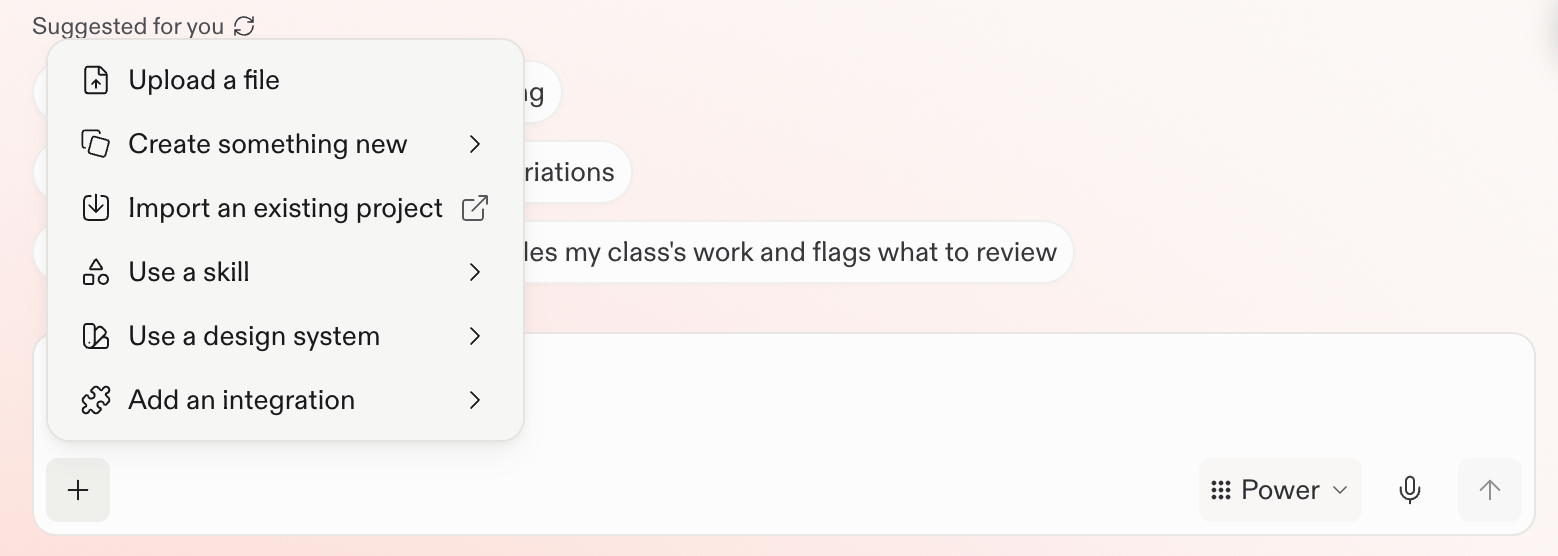
Sélectionnez le menu **plus** dans la zone d'invite pour charger un fichier, importer un travail existant, utiliser une Compétence ou un système de design, ou ajouter une intégration.

<Frame>
  <img src="https://mintcdn.com/replit/teDUL4A-lNO7dv1O/images/chat/prompt-box-plus-menu.png?fit=max&auto=format&n=teDUL4A-lNO7dv1O&q=85&s=7fd877ec8f84f73ec684181b9ec4f7b3" alt="Menu plus de la zone d'invite avec Charger un fichier, Créer quelque chose de nouveau, Importer un projet existant, Utiliser une compétence, Utiliser un système de design, et Ajouter une intégration" width="1558" height="556" data-path="images/chat/prompt-box-plus-menu.png" />
</Frame>

## Choisissez le contexte pour la tâche

Vous pouvez ajouter des fichiers, des captures d'écran et des images, des sources web et de la recherche, ainsi que des outils connectés. Choisissez les sources qui aident la tâche en cours :

* **[Fichiers, captures d'écran et images](/fr/chat/upload-and-use-files) :** Ajoutez des documents, feuilles de calcul, exports, captures d'écran ou références visuelles contenant des preuves ou des exigences utiles.
* **[Sources web et recherche](/fr/features/agent/web-search) :** Demandez à Replit de rechercher sur le web lorsque des informations actuelles ou des perspectives extérieures amélioreraient le résultat.
* **[Intégrations](/fr/chat/integrate-your-tools) :** Connectez les outils dont vous avez besoin, puis indiquez les services, canaux, enregistrements ou autres informations que Replit doit prendre en compte.
* **[Contexte de design](/fr/chat/work-with-figma) :** Joignez un frame Figma lorsque la mise en page, la hiérarchie ou la direction visuelle importent.
* **[Travail existant](/fr/chat/import-a-project) :** Importez un Projet lorsque vous souhaitez poursuivre la construction à partir de code, d'un design ou d'un travail créé ailleurs. Importer un Projet est différent de joindre un fichier comme preuve.

Vous pouvez aussi coller un lien pertinent dans votre demande ou demander à Replit d'effectuer une recherche web.

## Choisissez une source de contexte

<section className="chat-mkt chat-workflow-grid has-visuals">
  <a className="chat-example has-visual" href="/fr/chat/upload-and-use-files">
    <FilesCardVisual />

    <span>
      <Icon icon="file-arrow-up" size={19} />
    </span>

    <div className="chat-card-title">Charger et utiliser des fichiers</div>
    <p>Posez des questions sur un fichier téléchargé ou utilisez-le comme preuve.</p>
    <div className="chat-card-link">Explorer →</div>
  </a>

  <a className="chat-example has-visual" href="/fr/chat/work-with-figma">
    <FigmaCardVisual />

    <span>
      <Icon icon="figma" size={19} />
    </span>

    <div className="chat-card-title">Travailler avec Figma</div>
    <p>Utilisez un frame spécifique lorsque la direction visuelle compte.</p>
    <div className="chat-card-link">Explorer →</div>
  </a>

  <a className="chat-example has-visual" href="/fr/chat/integrate-your-tools">
    <IntegrationsCardVisual />

    <span>
      <Icon icon="plug" size={19} />
    </span>

    <div className="chat-card-title">Intégrer vos outils</div>
    <p>Connectez des services qui détiennent des informations pertinentes ou prennent en charge des actions.</p>
    <div className="chat-card-link">Explorer →</div>
  </a>

  <a className="chat-example has-visual" href="/fr/chat/import-a-project">
    <ImportProjectCardVisual />

    <span>
      <Icon icon="file-import" size={19} />
    </span>

    <div className="chat-card-title">Importer un Projet existant</div>

    <p>
      Poursuivez la construction à partir de code existant, d'un design ou
      d'un autre travail de projet.
    </p>

    <div className="chat-card-link">Explorer →</div>
  </a>
</section>

Pour des informations publiques actuelles, suivez le [guide de recherche web](/fr/features/agent/web-search). [MCP](/fr/chat/connect-through-mcp) est un chemin d'extension distinct pour les outils et clients compatibles.
