> ## Documentation Index
> Fetch the complete documentation index at: https://docs.replit.com/llms.txt
> Use this file to discover all available pages before exploring further.
# Security scan levels
> Compare Security Center Levels 1, 2, and 3 to choose dependency checks, an Agent source-code review, or a black-box test of your running app.
Security Center offers three scan levels. Each level adds checks to the previous level, from dependency checks to source-code review and live-app testing.
## Compare the levels
| Check | Level 1: Basic security checks | Level 2: Deep security scan | Level 3: AI pentest |
| - | - | - | - |
| Dependency and package checks | Yes | Yes | Yes |
| Agent static analysis of your code | No | Yes | Yes |
| External black-box test of your live Preview | No | No | Yes |
Scan levels describe **what a scan checks**, not how severe a finding is. Findings have separate severity ratings, such as critical, high, medium, and low.
Level 1 is free. Level 2 requires a paid Replit plan. Level 3 has additional plan and project-access requirements.
Agent work in Levels 2 and 3 is subject to [Agent usage billing](/billing/ai-billing).
If a scan level is unavailable, check your project's access and the upgrade guidance in Security Center.
## Level 1: Basic security checks
Level 1 runs free dependency and package checks. Use it to find known vulnerabilities in the libraries your app depends on.
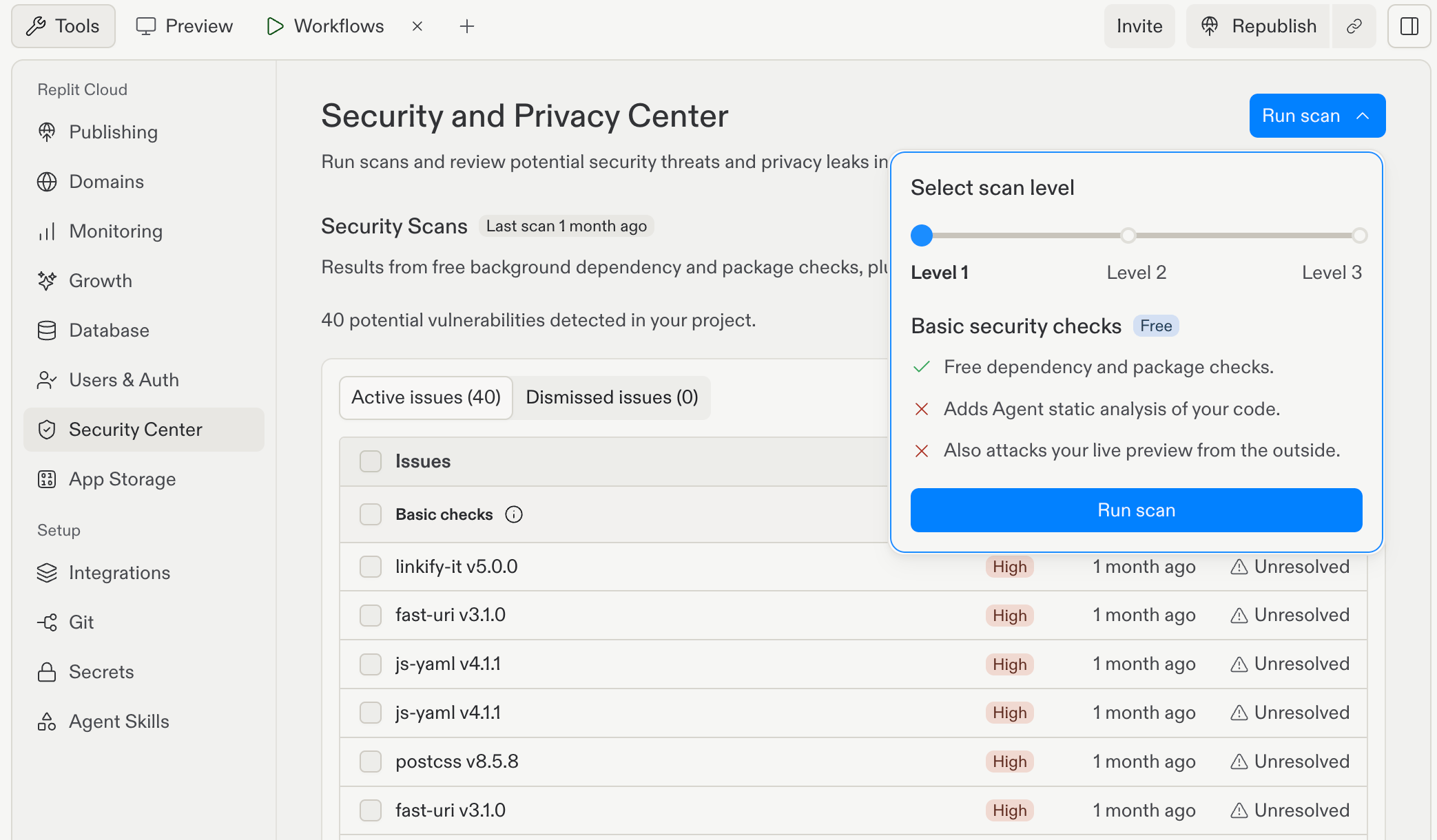 Level 1 does not run Agent static analysis of your application code or test your live Preview from the outside.
A clean dependency scan does not mean your own code has no vulnerabilities.
To run it, open the **Run scan** menu, select **Level 1**, then select **Run scan** inside the menu.
## Level 2: Deep security scan
Level 2 includes Level 1 checks and adds an Agent security review of your source code. Use it to investigate vulnerabilities in your application's implementation.
Security Agent combines model-based review with static analysis. It can identify risks such as SQL injection, cross-site scripting (XSS), sensitive data in logs, and architectural vulnerabilities.
Level 2 does not include an external black-box test of your running app.
Level 1 does not run Agent static analysis of your application code or test your live Preview from the outside.
A clean dependency scan does not mean your own code has no vulnerabilities.
To run it, open the **Run scan** menu, select **Level 1**, then select **Run scan** inside the menu.
## Level 2: Deep security scan
Level 2 includes Level 1 checks and adds an Agent security review of your source code. Use it to investigate vulnerabilities in your application's implementation.
Security Agent combines model-based review with static analysis. It can identify risks such as SQL injection, cross-site scripting (XSS), sensitive data in logs, and architectural vulnerabilities.
Level 2 does not include an external black-box test of your running app.
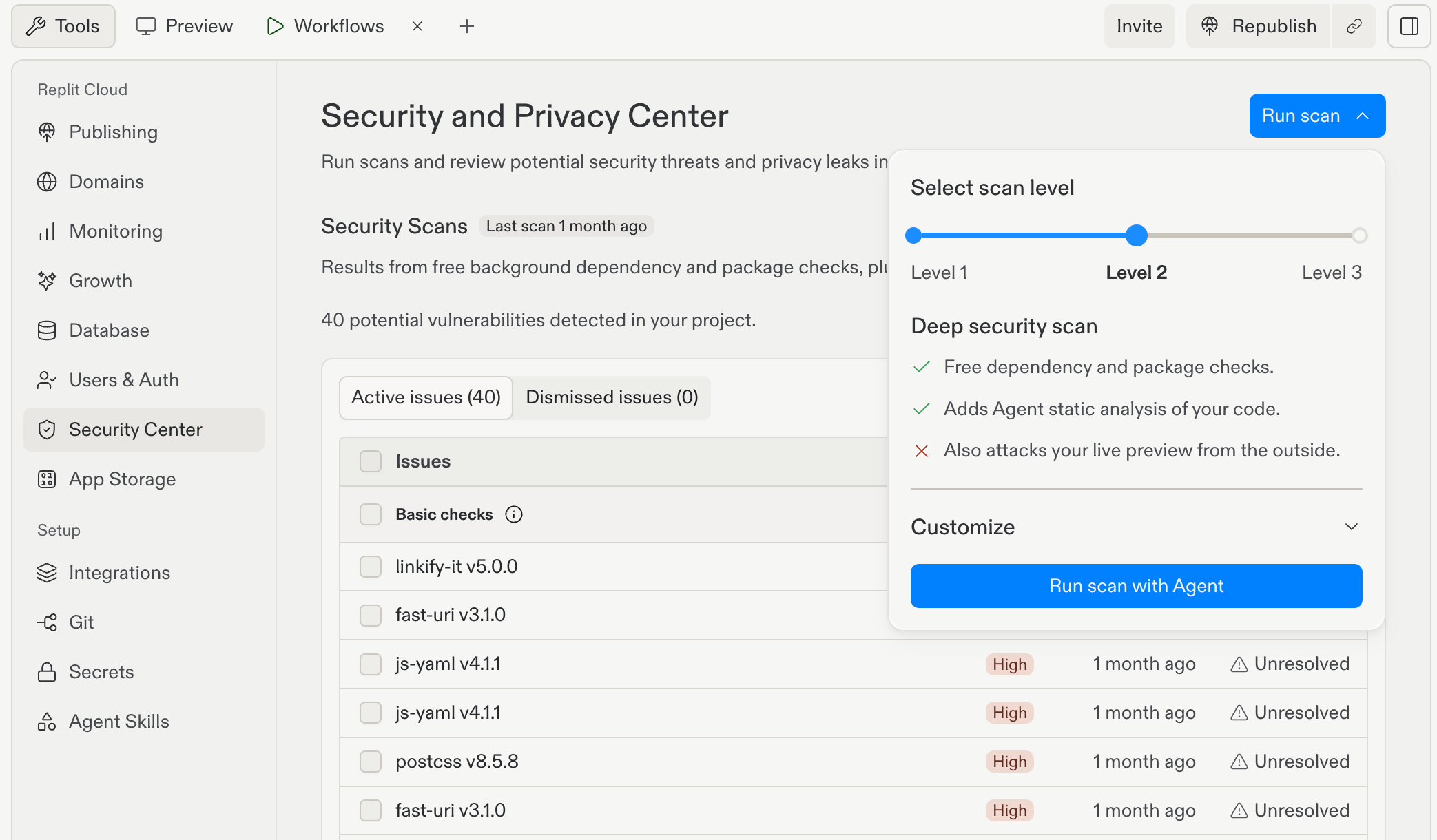 Select **Level 2**, optionally expand **Customize** to add context, then select **Run scan with Agent**.
See [Agent security scans](/features/security/agent-security-scans) for the source-code review workflow and how to review and fix findings.
## Level 3: AI pentest
Level 3 includes Level 2 checks and adds an external black-box penetration test of your live Preview.
The black-box test examines the running app through browser and network interactions without using its source code. The separate Agent source-code review and black-box test run in parallel.
Use Level 3 when you want to examine both the implementation and the running app's externally observable behavior.
Select **Level 2**, optionally expand **Customize** to add context, then select **Run scan with Agent**.
See [Agent security scans](/features/security/agent-security-scans) for the source-code review workflow and how to review and fix findings.
## Level 3: AI pentest
Level 3 includes Level 2 checks and adds an external black-box penetration test of your live Preview.
The black-box test examines the running app through browser and network interactions without using its source code. The separate Agent source-code review and black-box test run in parallel.
Use Level 3 when you want to examine both the implementation and the running app's externally observable behavior.
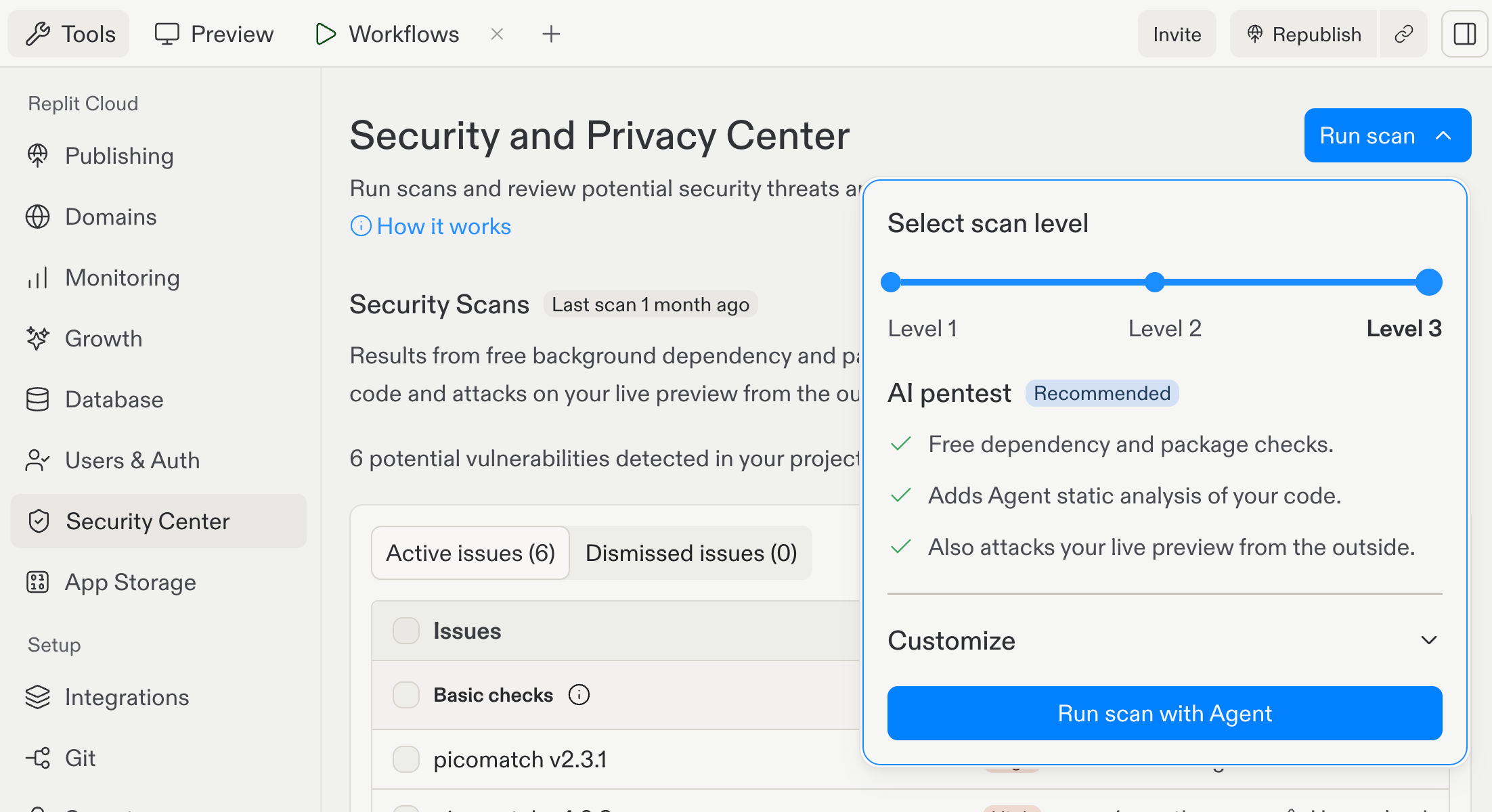 See [Black-box pen tests](/features/security/black-box-pen-tests) for the full Level 3 workflow.
## Choose and run a scan
In your project's **Tools** pane, select **Security Center**.
Select **Run scan** at the top of Security Center, then choose the level that matches your review.
Start the selected scan and wait for it to finish. For Level 3, review findings from both the source-code review and black-box test.
Review findings before sending accepted issues to Agent. After applying fixes, rerun the scan and republish to update your published app.
## How levels differ from publish checks
Publish checks are separate from on-demand Security Center scans. Turning on **Block publishing of critical vulnerabilities** does not run a Level 2 Agent review or a Level 3 black-box test.
A passing publish check is not a guarantee that your application code has no vulnerabilities. Run a source-code review or live-app test when you need that coverage.
No scan guarantees that your app is secure. Use scans alongside code review, tests, and other security checks.
## Next steps
* Review and manage findings in the [Project Security Center](/features/security/project-security-center).
* Learn the source-code workflow in [Agent security scans](/features/security/agent-security-scans).
* Test your running app with [Black-box pen tests](/features/security/black-box-pen-tests).
See [Black-box pen tests](/features/security/black-box-pen-tests) for the full Level 3 workflow.
## Choose and run a scan
In your project's **Tools** pane, select **Security Center**.
Select **Run scan** at the top of Security Center, then choose the level that matches your review.
Start the selected scan and wait for it to finish. For Level 3, review findings from both the source-code review and black-box test.
Review findings before sending accepted issues to Agent. After applying fixes, rerun the scan and republish to update your published app.
## How levels differ from publish checks
Publish checks are separate from on-demand Security Center scans. Turning on **Block publishing of critical vulnerabilities** does not run a Level 2 Agent review or a Level 3 black-box test.
A passing publish check is not a guarantee that your application code has no vulnerabilities. Run a source-code review or live-app test when you need that coverage.
No scan guarantees that your app is secure. Use scans alongside code review, tests, and other security checks.
## Next steps
* Review and manage findings in the [Project Security Center](/features/security/project-security-center).
* Learn the source-code workflow in [Agent security scans](/features/security/agent-security-scans).
* Test your running app with [Black-box pen tests](/features/security/black-box-pen-tests).