> ## Documentation Index
> Fetch the complete documentation index at: https://docs.replit.com/llms.txt
> Use this file to discover all available pages before exploring further.
# Data recovery
> Restore your development database to a checkpoint or roll your production database back to a point in time.
Mistakes happen: a bad schema change, deleted rows, or an Agent session that went sideways. Replit gives you a recovery path for each database.
| Database | Recovery method | Availability |
| ----------- | --------------------- | ------------------------------------------------ |
| Development | Checkpoint rollback | All plans |
| Production | Point-in-time restore | Core: 7 days of history. Pro and Teams: 28 days. |
## Restore your development database
You can revert your app and development database to a previous state using the [rollback feature](/features/version-control/checkpoints-and-rollbacks/). This restores your database to any checkpoint created by Agent.
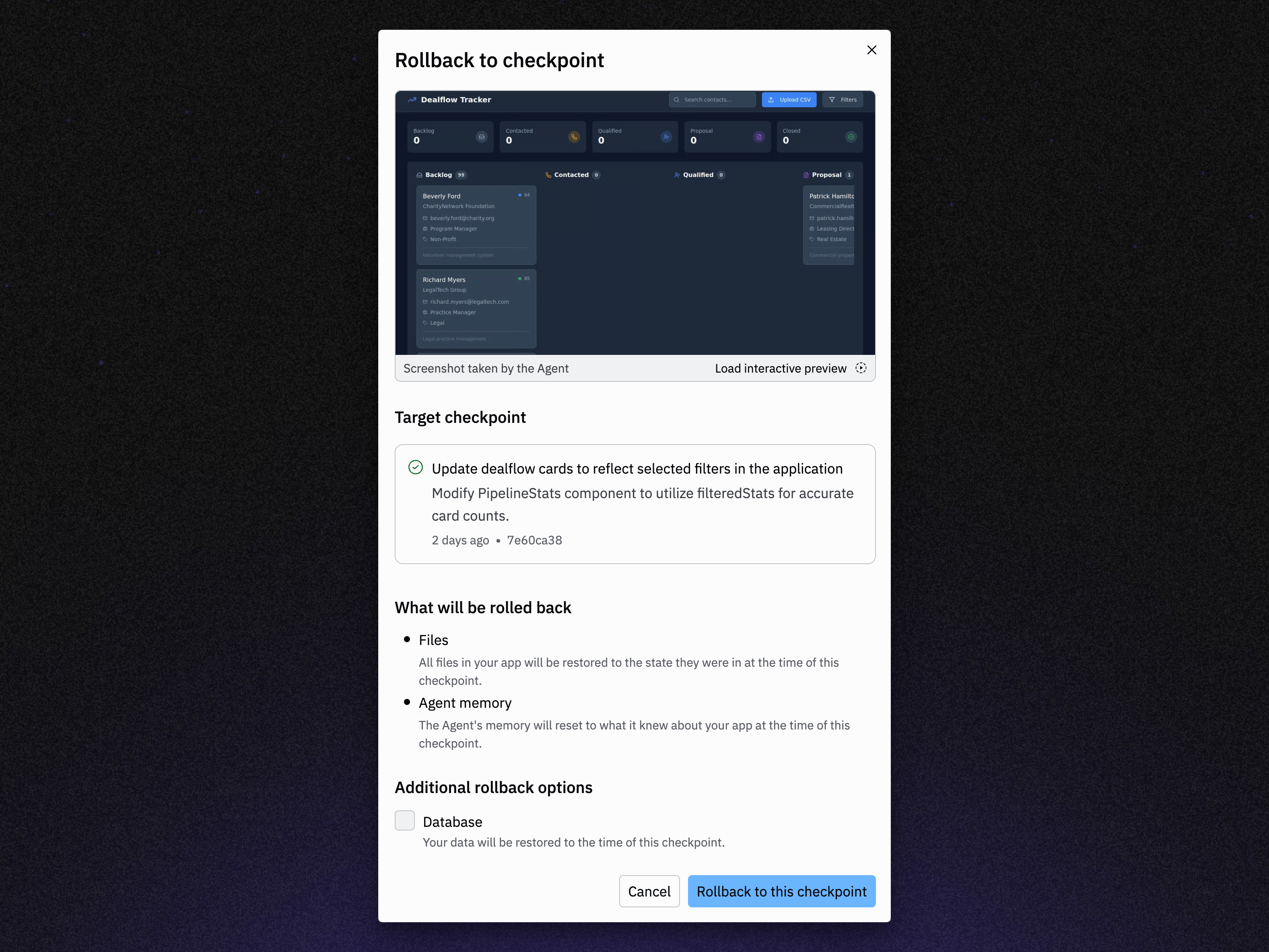 Make sure to select "Database" under "Additional rollback options" when restoring to the state of a checkpoint. This restores your database to the state it was at the time of the checkpoint.
## Restore your production database
For production databases, you can restore to a specific moment using point-in-time restore.
Make sure to select "Database" under "Additional rollback options" when restoring to the state of a checkpoint. This restores your database to the state it was at the time of the checkpoint.
## Restore your production database
For production databases, you can restore to a specific moment using point-in-time restore.
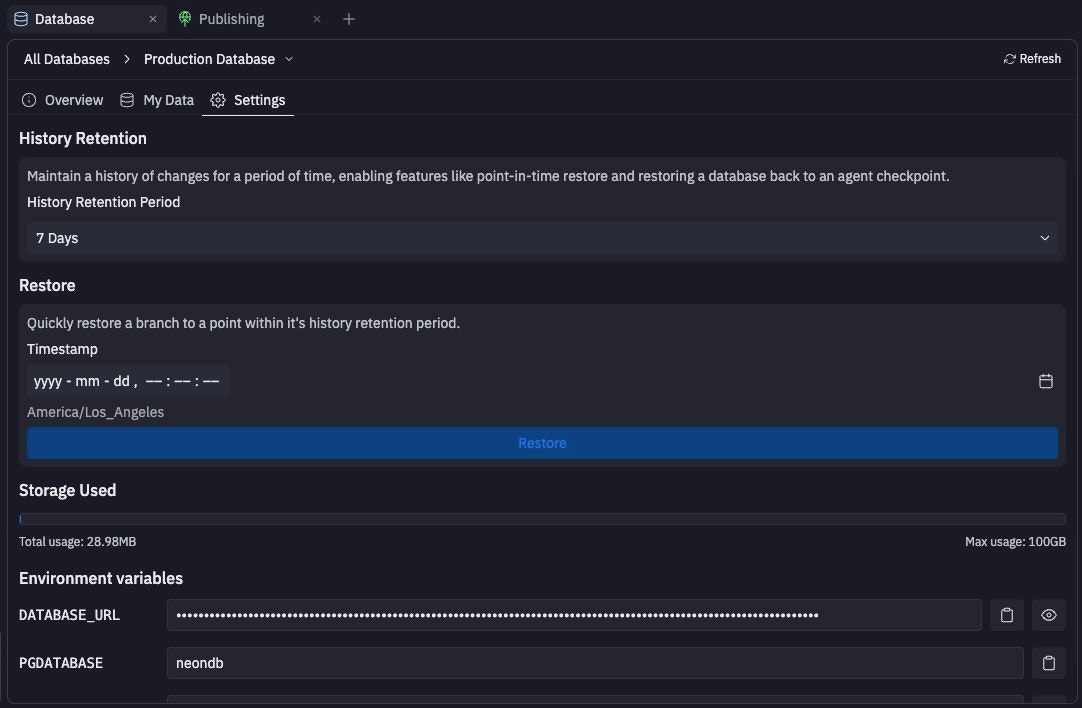 How far back you can restore depends on your plan: the Core plan retains up to 7 days of history, while Pro and Teams plans retain up to 28 days. If you downgrade from Pro to Core, your retention window is reduced to 7 days.
Restoring your database doesn't restore your app's code, and rolling back your app doesn't restore your database. To bring both back to the same moment: restore the database, then [roll back to the matching checkpoint](/features/version-control/checkpoints-and-rollbacks/) and publish your app again.
## Troubleshooting publishing failures
If publishing fails due to database issues:
1. **Check the publishing logs** for specific error messages about database connectivity or schema conflicts
2. **Review recent schema changes** for potential conflicts with existing application code
3. **Test your changes in a deployment preview** before attempting to republish
## Next steps
* [Development and production](/features/data-and-storage/development-and-production): How your two databases work together.
* [Checkpoints and rollbacks](/features/version-control/checkpoints-and-rollbacks/): Roll your whole app back.
How far back you can restore depends on your plan: the Core plan retains up to 7 days of history, while Pro and Teams plans retain up to 28 days. If you downgrade from Pro to Core, your retention window is reduced to 7 days.
Restoring your database doesn't restore your app's code, and rolling back your app doesn't restore your database. To bring both back to the same moment: restore the database, then [roll back to the matching checkpoint](/features/version-control/checkpoints-and-rollbacks/) and publish your app again.
## Troubleshooting publishing failures
If publishing fails due to database issues:
1. **Check the publishing logs** for specific error messages about database connectivity or schema conflicts
2. **Review recent schema changes** for potential conflicts with existing application code
3. **Test your changes in a deployment preview** before attempting to republish
## Next steps
* [Development and production](/features/data-and-storage/development-and-production): How your two databases work together.
* [Checkpoints and rollbacks](/features/version-control/checkpoints-and-rollbacks/): Roll your whole app back.