> ## Documentation Index
> Fetch the complete documentation index at: https://docs.replit.com/llms.txt
> Use this file to discover all available pages before exploring further.
# Workspace geography
> Choose where development resources for a Workspace and its new Projects are hosted.
Workspace geography controls where development resources for a Workspace are hosted. You select it when you create the Workspace, and new Projects and resources in that Workspace use the selected location.
Workspace geography and [publishing
geography](/features/security/geography#publishing-geography) can differ.
Publishing geography controls where a published Project runs.
## What Workspace geography controls
A Workspace brings together Projects, people, settings, shared resources, integrations, and billing. Within each Project, you use the Project Editor and Replit chat. Development resources include the development version of your app and its development database.
Only Pro customers can select a specific Workspace region.
Free and Core customers have their Workspace region set automatically. This usually selects the Workspace region closest to you. New Projects and resources in the Workspace use that location. You cannot change the region after you create the Workspace.
## Select a Workspace region
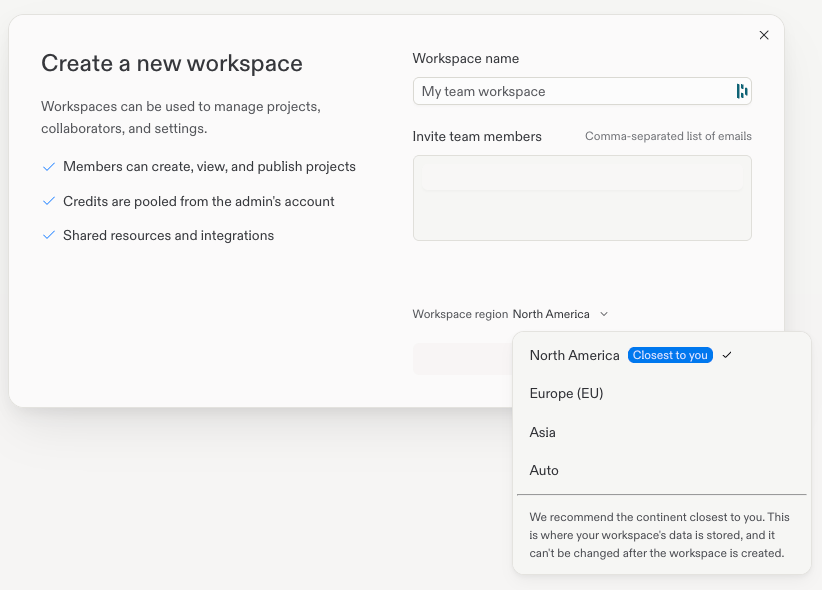
If you are a Pro customer, you can select a region when you create a Workspace:
Open the **Create a new workspace** form.
Enter the Workspace name and optional member email addresses.
Open **Workspace region**, then select **North America**, **Europe (EU)**,
or **Asia**.
Select **Create workspace**.
 ## Available geographies
| Geography | Workspace selection |
| :---------------- | :------------------ |
| **North America** | Yes |
| **Europe (EU)** | Yes |
| **Asia** | Yes |
| **South America** | No |
| **Australia** | No |
## Next steps
* [Workspaces](/features/collaboration/workspaces): Learn how Workspaces organize Projects, people, settings, shared resources, and billing.
* [Publishing geography](/features/security/geography#publishing-geography): Choose where a published Project runs.
To learn more about how Replit handles data processing, see the [Data Processing Addendum](https://replit.com/dpa).
## Available geographies
| Geography | Workspace selection |
| :---------------- | :------------------ |
| **North America** | Yes |
| **Europe (EU)** | Yes |
| **Asia** | Yes |
| **South America** | No |
| **Australia** | No |
## Next steps
* [Workspaces](/features/collaboration/workspaces): Learn how Workspaces organize Projects, people, settings, shared resources, and billing.
* [Publishing geography](/features/security/geography#publishing-geography): Choose where a published Project runs.
To learn more about how Replit handles data processing, see the [Data Processing Addendum](https://replit.com/dpa).