> ## Documentation Index
> Fetch the complete documentation index at: https://docs.replit.com/llms.txt
> Use this file to discover all available pages before exploring further.
# Replit App Configuration
> Learn how to configure your Replit app using .replit and replit.nix files.
Replit Apps are configured with two files: the `.replit` and `replit.nix`. They affect how your Replit App behaves, from code execution to development tools and languages.
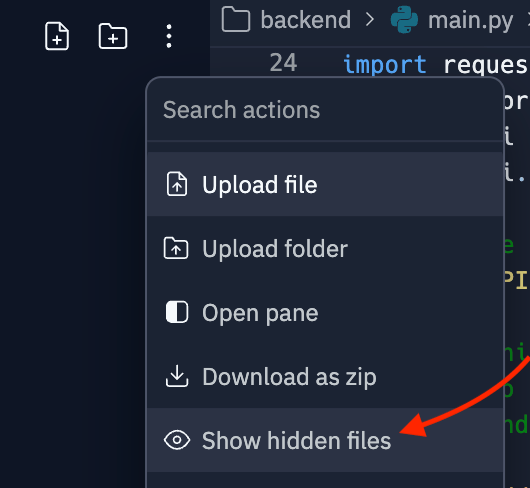
These configuration files are hidden by default. Show them in your Replit App by selecting "Show hidden files" from the filetree menu.
 ## `replit.nix` file
Replit uses `Nix` to manage packages and environments. The `replit.nix` file is used for:
**Specifying system dependencies:** Define exactly what software packages your Replit App requires, managed through Nix, a package manager.
**Creating reproducible environments:** Ensure your development environment is consistent and reproducible, ideal for collaborative projects and testing across multiple systems.
You can manage Nix packages visually through the `Dependencies` tool. Learn more in the [System Dependencies](/features/project-setup/dependency-management#system-dependencies) guide.
To configure packages with the `replit.nix` file, you can list [Nix packages](https://search.nixos.org/packages) in the `deps` array, prefixed with `pkgs.`. Any changes will be synced after your shell is reloaded.
```nix theme={null}
{ pkgs }: {
deps = [
pkgs.nodejs-19_x
pkgs.nodePackages.typescript-language-server
pkgs.yarn
pkgs.replitPackages.jest
];
}
```
## `.replit` file
The `.replit` file controls your Replit App's behavior. It uses the `toml` [configuration format](https://toml.io/en/). Here are some of the key aspects that can be configured:
**Run command:** Specify the command that executes when the Run button is selected. Each template has a default run command to allow code execution immediately. For more customized and complex apps, use [Workflows](/features/workspace-tools/workflows).
**Language Server Protocol (LSP)**: Provides features like auto-complete, code navigation, code highlighting, and real-time linting and errors.
**Environment variables:** Set and manage environment variables essential for your applications to run correctly.
**Dependencies and packages:** Manage package installations and configurations directly through the `.replit` file, ensuring your Replit App has all the necessary tools ready upon startup. You can manage dependencies visually through the `Dependencies` tool. Learn more in the [System Modules](/features/project-setup/dependency-management#advanced-configuration) guide.
For Python applications, the default `.replit` file looks like:
```toml theme={null}
entrypoint = "main.py"
modules = ["python-3.10:v18-20230807-322e88b"]
[nix]
channel = "stable-23_05"
[unitTest]
language = "python3"
[gitHubImport]
requiredFiles = [".replit", "replit.nix"]
[deployment]
run = ["python3", "main.py"]
deploymentTarget = "cloudrun"
```
The following table provides a view of each setting within the `.replit` file, explaining what each configuration does and its impact on the Replit App environment.
| **Configuration key** | **Value/Example** | **Description** |
| ----------------------------------------------- | -------------------------------------- | -------------------------------------------------------------------------------------------------------------------------------------------------------------------------------------------------- |
| `entrypoint` | `main.py` | Specifies the main file to be executed and displayed by default when the editor is opened. You can rename the file name based on your application. |
| `modules` | `["python-3.10:v18-20230807-322e88b"]` | Defines specific versions of programming languages or other major dependencies supported by Replit. |
| `[nix]` | | Specifies settings for using Nix, a package manager, to manage system dependencies. Refer to [Dependency Management](/features/project-setup/dependency-management) document for more information. |
| `channel` | `stable-23_05` | Indicates the Nix channel to use, which affects the versions of system dependencies available. |
| `packages` | `["cowsay", "htop"]` | Specifies some Nix packages to install. For more fine-grained control you can also use `replit.nix`. |
| `[unitTest]` | | Configures settings related to unit testing within the Replit App. |
| `language` | `python3` | Specifies the language used for unit testing, indicating that Python 3 is used for writing tests. |
| `[gitHubImport]` | | Settings that affect how projects are imported from GitHub, specifically which files must be included. |
| `requiredFiles` | `[".replit", "replit.nix"]` | Lists the files that must be present when importing the project to ensure it functions correctly. |
| `[deployment]` | | Contains settings for deploying the application from the Replit App to a live environment. |
| `run` | `["python3", "main.py"]` | Command executed to start the application during deployment. |
| `deploymentTarget` | `cloudrun` | Specifies the deployment target platform for hosting the application. |
Now that you have an idea of the default configurations of the `.replit` file use the next sections to understand how to configure basic and advanced settings for your Replit App.
## Configuring basic settings
### Entrypoint
This is the main file of your project. If you do not define a `run` property, `entrypoint` is the file that gets executed by the runtime.
```toml theme={null}
entrypoint = ".py"
```
### `Run` command
The `run` property in the `.replit` file is a key feature that determines the initial command or series of commands executed when the `Run` button is selected in a Replit environment. The `Run` command can be specified either as a string representing the command to execute, or an array of strings representing the command and individual arguments to that command.
Some common ways to configure the `Run` command:
* **Single command:**
This example shows how to pass single command to execute directly in the Replit App. With this in your `.replit` file, pressing the `Run` button will display a greeting in the `Console` pane:
**Example:** `run = "echo 'Hello, Replit!'"`
* **Explicit arguments:**
In some situations it may be beneficial to be more explicit, avoiding the need for parsing quotes or shell interpolation rules. You can rewrite the above example to separate the arguments.
Note, you no longer need both `'` and `"`, since you are explicitly passing the greeting as the first and only argument to `echo`:
**Example:** `run = ["echo", "Hello, Replit!"]`
* **Multiple commands:**
This example shows how to run multiple processes, such as a frontend and a backend, simultaneously. This could be useful if developing a python backend and a typescript frontend, where each server binds to a different port:
**Example:** `run = "python -m app & npm run start & wait"`
#### Process management
While multiple commands can be simultaneously run with `&`, you may want a better experience distinguishing logs between services. You can [add system dependencies](/features/project-setup/dependency-management#system-dependencies) like [`process-compose`](https://github.com/F1bonacc1/process-compose) to better orchestrate multiple processes.
#### `Build` phase
For some languages or runtimes, there is a separate compilation phase before code can be `run`. This covers both compiled languages like TypeScript, Golang, or Java, or offering a parameter you can use to reset your environment, data, or configuration before the next `run` is invoked.
* **Compiling:**
In a TypeScript repository, you may find yourself needing to run `tsc` prior to executing your code.
**Example:**
```toml theme={null}
build = "tsc app.ts"
run = "node app.js"
```
#### Including environment variables
To supply environment variables to your service before execution, you can expand the `run` property into a [table](https://toml.io/en/v1.0.0#table).
This is a more involved change, and likely requires moving where your `run = "..."` property is located inside your `.replit` file.
The following diff shows supplying the command by way of `[run]`'s `args`, as well as the variable `NAME` supplied in `[run.env]`:
```diff theme={null}
-run = ["bash", "-c", "echo \"Hello, $NAME!\""]
modules = ["nodejs-20"]
hidden = [".pythonlibs"]
+# We need to move our new [run] down past all the
+# top-level properties that do not start with a `[`!
+[run]
+args = ["bash", "-c", "echo \"Hello, $NAME!\""]
+
+[run.env]
+NAME="Replit"
[nix]
channel = "stable-23_11"
```
#### Interactivity
Interactive programs can also be launched by way of the `Run` button, offering a way to distinguish your development environment from the terminal where your program is running.
Consider the following tally script:
**Example**
```toml theme={null}
[run]
args = ["bash", "-c", """
count=0
while read -p "$PROMPT" -r next && [ -n "$next" ]; do
count=$((count+next))
done
echo "The numbers you entered sum to $count!"
"""]
[run.env]
PROMPT = "Next number ([Enter] to end): "
```
## Advanced configuration options
Explore the detailed configuration options available for your Replit App. You can customize your development environment, manage run commands, integrate language services, and handle dependencies.
| **Configuration** | **Key** | **Value/Example** | **Description** |
| ----------------- | ----------------------------------- | ------------------------------------------- | -------------------------------------------------------------------------------- |
| onBoot | `onBoot` | `onBoot = "npm install"` | Command that executes when the Replit App boots up. |
| compile | `compile` | (No default example) | Command that runs before the `run` command, used in compiled languages like C++. |
| language | `language` | `language = "javascript"` | Specifies the language during a GitHub import or when creating a Replit App. |
| entrypoint | `entrypoint` | `entrypoint = "index.js"` | Main file to run and display when opening the editor. |
| hidden | `hidden` | `hidden = [".config", "package-lock.json"]` | Files or folders to hide by default in the side file tree. |
| audio | `audio` | `audio = true` | Enables System-Wide Audio when set to `true`. |
### Notes about System-Wide Audio
When setting `audio = true` in your `.replit` file, you may need to restart the development environment. Open the command palette with `Cmd+K` (Mac) or `Ctrl+K` (Windows), search for **Restart compute**, and select it.
When running a graphical application, you will see a pair of headphones with a checkbox in the lower right of the `Output` pane.
Due to browser restrictions, this will need to be enabled every time you refresh.
```toml theme={null}
# Ensure this is at the top of your `.replit` file, outside of any `[`-bracketed section
audio = true
```
## Packager configuration
| **Configuration** | **Key** | **Value/Example** | **Description** |
| ----------------- | ------------------------------------------------- | --------------------------------------------- | ---------------------------------------------------------------------------- |
| packager | `language` | `packager.language = "python3"` | Language used for package operations. |
| packager features | `guessImports` | `packager.features.guessImports = true` | Automatically guess packages to install prior to running the Replit App. |
| packager features | `packageSearch` | `packager.features.packageSearch = true` | Enables support for the packager when set to `true`. |
| packager features | `enabledForHosting` | `packager.features.enabledForHosting = false` | Sets whether hosting the Replit App requires running a package installation. |
| packager | `afterInstall` | `afterInstall = "echo 'package installed'"` | Command executed after a new package is installed via the packager. |
| packager | `ignoredPaths` | `ignoredPaths = [".git"]` | Paths to ignore while attempting to guess packages. |
| packager | `ignoredPackages` | `ignoredPackages = ["twitter", "discord"]` | Modules should never attempt to guess a package during installation. |
### Example `.replit` configuration for packager configuration
```toml theme={null}
# Define the language for the Replit App
packager.language = "python3"
# Enable features for automatic package management
[packager.features]
guessImports = true
packageSearch = true
enabledForHosting = false
# Command to run after each package installation
packager.afterInstall = "echo 'Package installed successfully'"
# Define paths and packages that should be ignored by the package manager
packager.ignoredPaths = [".git", "node_modules"]
packager.ignoredPackages = ["twitter", "discord"]
# Additional deployment settings
[deployment]
run = ["python3", "app.py"]
```
## Deployment configuration
| **Configuration** | **Key** | **Value/Example** | **Description** |
| ----------------- | ------------------------------------- | ------------------------------------ | ----------------------------------------------------------------- |
| deployment | `run` | `deployment.run = "npm start"` | Command that executes when a Deployment container starts. |
| deployment | `build` | `deployment.build = "npm run build"` | Command that executes before running a Deployment. |
| deployment | `ignorePorts` | `deployment.ignorePorts = true` | If `true`, deployment success doesn't require an open port check. |
### Example `.replit` configuration for deployment configuration
```toml theme={null}
# Specifies the main entry point for the project
entrypoint = "app.js"
# Configuration settings for deploying the application
[deployment]
run = "npm start"
build = "npm run build"
ignorePorts = true
```
**Interpreter configuration** has been deprecated and is no longer available in Replit. Instead, you are encouraged to use the `Run` commands to configure how scripts and applications are executed within your Replit App environment.
## Port configuration
| **Configuration** | **Key** | **Value/Example** | **Description** |
| ----------------- | --------------------------------------- | ------------------- | --------------------------------------------------- |
| ports | `localPort` | `localPort = 3000` | Port that Replit binds to an external port. |
| ports | `externalPort` | `externalPort = 80` | Publicly accessible port linked to the `localPort`. |
### Example `.replit` configuration file for managing ports
```toml theme={null}
# Networking configuration to expose your application on specific ports
[[ports]]
localPort = 3000
externalPort = 80
```
## Accessing Replit App environment metadata
### Node.js
To access all environment variables:
`console.log(process.env);`
To access a single variable (REPL\_SLUG):
`console.log(process.env.REPL_SLUG);`
### Python
To access all environment variables:
```python theme={null}
import os
print(os.environ)
```
To access a single variable (REPL\_SLUG):
```python theme={null}
import os
variable = os.environ.get('REPL_SLUG')
print(variable)
```
### Rust
To access all environment variables:
```rust theme={null}
use std::env;
fn main() {
for (key, value) in env::vars() {
println!("{}: {}", key, value);
}
}
```
To access a single variable (REPL\_SLUG):
```rust theme={null}
use std::env;
fn main() {
let variable = env::var("REPL_SLUG").unwrap();
println!("{}", variable);
}
```
## Environment variables
Following are the environment variables accessible from within your Replit App:
| key | description |
| ------------------------------------------------- | ------------------------------------------------------------------------------------------------------------------------------------------------------------------------------------ |
| `REPL_OWNER` | The username of the owner of the Replit App. If your Replit App is text-based and has no webserver, `REPL_OWNER` will reflect the value of the current user accessing the Replit App |
| `REPL_ID` | The unique UUID string of your Replit App |
| `HOME` | The home path of your Replit App |
| `system` | The operating system running on your Replit App |
| `LANG` | Sets the language and character encoding for your Replit App, affecting how text is processed and displayed |
| `REPL_IMAGE` | The docker image that corresponds to your Replit App |
| `REPL_LANGUAGE` | The programming language configured for your Replit App, used to determine the runtime environment and tooling |
| `REPL_PUBKEYS` | A stringified JSON object containing different public API keys |
| `REPL_SLUG` | A simplified, machine-readable version of the name of the Replit App, suitable for use in URLs and file names |
| `PRYBAR_FILE` | The main/entrypoint file of your Replit App |
| `REPLIT_DEV_DOMAIN` | Provides the `replit.dev` URL for your Replit App in the Project Editor. Note that this environment variable is not available in Deployments |
## `replit.nix` file
Replit uses `Nix` to manage packages and environments. The `replit.nix` file is used for:
**Specifying system dependencies:** Define exactly what software packages your Replit App requires, managed through Nix, a package manager.
**Creating reproducible environments:** Ensure your development environment is consistent and reproducible, ideal for collaborative projects and testing across multiple systems.
You can manage Nix packages visually through the `Dependencies` tool. Learn more in the [System Dependencies](/features/project-setup/dependency-management#system-dependencies) guide.
To configure packages with the `replit.nix` file, you can list [Nix packages](https://search.nixos.org/packages) in the `deps` array, prefixed with `pkgs.`. Any changes will be synced after your shell is reloaded.
```nix theme={null}
{ pkgs }: {
deps = [
pkgs.nodejs-19_x
pkgs.nodePackages.typescript-language-server
pkgs.yarn
pkgs.replitPackages.jest
];
}
```
## `.replit` file
The `.replit` file controls your Replit App's behavior. It uses the `toml` [configuration format](https://toml.io/en/). Here are some of the key aspects that can be configured:
**Run command:** Specify the command that executes when the Run button is selected. Each template has a default run command to allow code execution immediately. For more customized and complex apps, use [Workflows](/features/workspace-tools/workflows).
**Language Server Protocol (LSP)**: Provides features like auto-complete, code navigation, code highlighting, and real-time linting and errors.
**Environment variables:** Set and manage environment variables essential for your applications to run correctly.
**Dependencies and packages:** Manage package installations and configurations directly through the `.replit` file, ensuring your Replit App has all the necessary tools ready upon startup. You can manage dependencies visually through the `Dependencies` tool. Learn more in the [System Modules](/features/project-setup/dependency-management#advanced-configuration) guide.
For Python applications, the default `.replit` file looks like:
```toml theme={null}
entrypoint = "main.py"
modules = ["python-3.10:v18-20230807-322e88b"]
[nix]
channel = "stable-23_05"
[unitTest]
language = "python3"
[gitHubImport]
requiredFiles = [".replit", "replit.nix"]
[deployment]
run = ["python3", "main.py"]
deploymentTarget = "cloudrun"
```
The following table provides a view of each setting within the `.replit` file, explaining what each configuration does and its impact on the Replit App environment.
| **Configuration key** | **Value/Example** | **Description** |
| ----------------------------------------------- | -------------------------------------- | -------------------------------------------------------------------------------------------------------------------------------------------------------------------------------------------------- |
| `entrypoint` | `main.py` | Specifies the main file to be executed and displayed by default when the editor is opened. You can rename the file name based on your application. |
| `modules` | `["python-3.10:v18-20230807-322e88b"]` | Defines specific versions of programming languages or other major dependencies supported by Replit. |
| `[nix]` | | Specifies settings for using Nix, a package manager, to manage system dependencies. Refer to [Dependency Management](/features/project-setup/dependency-management) document for more information. |
| `channel` | `stable-23_05` | Indicates the Nix channel to use, which affects the versions of system dependencies available. |
| `packages` | `["cowsay", "htop"]` | Specifies some Nix packages to install. For more fine-grained control you can also use `replit.nix`. |
| `[unitTest]` | | Configures settings related to unit testing within the Replit App. |
| `language` | `python3` | Specifies the language used for unit testing, indicating that Python 3 is used for writing tests. |
| `[gitHubImport]` | | Settings that affect how projects are imported from GitHub, specifically which files must be included. |
| `requiredFiles` | `[".replit", "replit.nix"]` | Lists the files that must be present when importing the project to ensure it functions correctly. |
| `[deployment]` | | Contains settings for deploying the application from the Replit App to a live environment. |
| `run` | `["python3", "main.py"]` | Command executed to start the application during deployment. |
| `deploymentTarget` | `cloudrun` | Specifies the deployment target platform for hosting the application. |
Now that you have an idea of the default configurations of the `.replit` file use the next sections to understand how to configure basic and advanced settings for your Replit App.
## Configuring basic settings
### Entrypoint
This is the main file of your project. If you do not define a `run` property, `entrypoint` is the file that gets executed by the runtime.
```toml theme={null}
entrypoint = ".py"
```
### `Run` command
The `run` property in the `.replit` file is a key feature that determines the initial command or series of commands executed when the `Run` button is selected in a Replit environment. The `Run` command can be specified either as a string representing the command to execute, or an array of strings representing the command and individual arguments to that command.
Some common ways to configure the `Run` command:
* **Single command:**
This example shows how to pass single command to execute directly in the Replit App. With this in your `.replit` file, pressing the `Run` button will display a greeting in the `Console` pane:
**Example:** `run = "echo 'Hello, Replit!'"`
* **Explicit arguments:**
In some situations it may be beneficial to be more explicit, avoiding the need for parsing quotes or shell interpolation rules. You can rewrite the above example to separate the arguments.
Note, you no longer need both `'` and `"`, since you are explicitly passing the greeting as the first and only argument to `echo`:
**Example:** `run = ["echo", "Hello, Replit!"]`
* **Multiple commands:**
This example shows how to run multiple processes, such as a frontend and a backend, simultaneously. This could be useful if developing a python backend and a typescript frontend, where each server binds to a different port:
**Example:** `run = "python -m app & npm run start & wait"`
#### Process management
While multiple commands can be simultaneously run with `&`, you may want a better experience distinguishing logs between services. You can [add system dependencies](/features/project-setup/dependency-management#system-dependencies) like [`process-compose`](https://github.com/F1bonacc1/process-compose) to better orchestrate multiple processes.
#### `Build` phase
For some languages or runtimes, there is a separate compilation phase before code can be `run`. This covers both compiled languages like TypeScript, Golang, or Java, or offering a parameter you can use to reset your environment, data, or configuration before the next `run` is invoked.
* **Compiling:**
In a TypeScript repository, you may find yourself needing to run `tsc` prior to executing your code.
**Example:**
```toml theme={null}
build = "tsc app.ts"
run = "node app.js"
```
#### Including environment variables
To supply environment variables to your service before execution, you can expand the `run` property into a [table](https://toml.io/en/v1.0.0#table).
This is a more involved change, and likely requires moving where your `run = "..."` property is located inside your `.replit` file.
The following diff shows supplying the command by way of `[run]`'s `args`, as well as the variable `NAME` supplied in `[run.env]`:
```diff theme={null}
-run = ["bash", "-c", "echo \"Hello, $NAME!\""]
modules = ["nodejs-20"]
hidden = [".pythonlibs"]
+# We need to move our new [run] down past all the
+# top-level properties that do not start with a `[`!
+[run]
+args = ["bash", "-c", "echo \"Hello, $NAME!\""]
+
+[run.env]
+NAME="Replit"
[nix]
channel = "stable-23_11"
```
#### Interactivity
Interactive programs can also be launched by way of the `Run` button, offering a way to distinguish your development environment from the terminal where your program is running.
Consider the following tally script:
**Example**
```toml theme={null}
[run]
args = ["bash", "-c", """
count=0
while read -p "$PROMPT" -r next && [ -n "$next" ]; do
count=$((count+next))
done
echo "The numbers you entered sum to $count!"
"""]
[run.env]
PROMPT = "Next number ([Enter] to end): "
```
## Advanced configuration options
Explore the detailed configuration options available for your Replit App. You can customize your development environment, manage run commands, integrate language services, and handle dependencies.
| **Configuration** | **Key** | **Value/Example** | **Description** |
| ----------------- | ----------------------------------- | ------------------------------------------- | -------------------------------------------------------------------------------- |
| onBoot | `onBoot` | `onBoot = "npm install"` | Command that executes when the Replit App boots up. |
| compile | `compile` | (No default example) | Command that runs before the `run` command, used in compiled languages like C++. |
| language | `language` | `language = "javascript"` | Specifies the language during a GitHub import or when creating a Replit App. |
| entrypoint | `entrypoint` | `entrypoint = "index.js"` | Main file to run and display when opening the editor. |
| hidden | `hidden` | `hidden = [".config", "package-lock.json"]` | Files or folders to hide by default in the side file tree. |
| audio | `audio` | `audio = true` | Enables System-Wide Audio when set to `true`. |
### Notes about System-Wide Audio
When setting `audio = true` in your `.replit` file, you may need to restart the development environment. Open the command palette with `Cmd+K` (Mac) or `Ctrl+K` (Windows), search for **Restart compute**, and select it.
When running a graphical application, you will see a pair of headphones with a checkbox in the lower right of the `Output` pane.
Due to browser restrictions, this will need to be enabled every time you refresh.
```toml theme={null}
# Ensure this is at the top of your `.replit` file, outside of any `[`-bracketed section
audio = true
```
## Packager configuration
| **Configuration** | **Key** | **Value/Example** | **Description** |
| ----------------- | ------------------------------------------------- | --------------------------------------------- | ---------------------------------------------------------------------------- |
| packager | `language` | `packager.language = "python3"` | Language used for package operations. |
| packager features | `guessImports` | `packager.features.guessImports = true` | Automatically guess packages to install prior to running the Replit App. |
| packager features | `packageSearch` | `packager.features.packageSearch = true` | Enables support for the packager when set to `true`. |
| packager features | `enabledForHosting` | `packager.features.enabledForHosting = false` | Sets whether hosting the Replit App requires running a package installation. |
| packager | `afterInstall` | `afterInstall = "echo 'package installed'"` | Command executed after a new package is installed via the packager. |
| packager | `ignoredPaths` | `ignoredPaths = [".git"]` | Paths to ignore while attempting to guess packages. |
| packager | `ignoredPackages` | `ignoredPackages = ["twitter", "discord"]` | Modules should never attempt to guess a package during installation. |
### Example `.replit` configuration for packager configuration
```toml theme={null}
# Define the language for the Replit App
packager.language = "python3"
# Enable features for automatic package management
[packager.features]
guessImports = true
packageSearch = true
enabledForHosting = false
# Command to run after each package installation
packager.afterInstall = "echo 'Package installed successfully'"
# Define paths and packages that should be ignored by the package manager
packager.ignoredPaths = [".git", "node_modules"]
packager.ignoredPackages = ["twitter", "discord"]
# Additional deployment settings
[deployment]
run = ["python3", "app.py"]
```
## Deployment configuration
| **Configuration** | **Key** | **Value/Example** | **Description** |
| ----------------- | ------------------------------------- | ------------------------------------ | ----------------------------------------------------------------- |
| deployment | `run` | `deployment.run = "npm start"` | Command that executes when a Deployment container starts. |
| deployment | `build` | `deployment.build = "npm run build"` | Command that executes before running a Deployment. |
| deployment | `ignorePorts` | `deployment.ignorePorts = true` | If `true`, deployment success doesn't require an open port check. |
### Example `.replit` configuration for deployment configuration
```toml theme={null}
# Specifies the main entry point for the project
entrypoint = "app.js"
# Configuration settings for deploying the application
[deployment]
run = "npm start"
build = "npm run build"
ignorePorts = true
```
**Interpreter configuration** has been deprecated and is no longer available in Replit. Instead, you are encouraged to use the `Run` commands to configure how scripts and applications are executed within your Replit App environment.
## Port configuration
| **Configuration** | **Key** | **Value/Example** | **Description** |
| ----------------- | --------------------------------------- | ------------------- | --------------------------------------------------- |
| ports | `localPort` | `localPort = 3000` | Port that Replit binds to an external port. |
| ports | `externalPort` | `externalPort = 80` | Publicly accessible port linked to the `localPort`. |
### Example `.replit` configuration file for managing ports
```toml theme={null}
# Networking configuration to expose your application on specific ports
[[ports]]
localPort = 3000
externalPort = 80
```
## Accessing Replit App environment metadata
### Node.js
To access all environment variables:
`console.log(process.env);`
To access a single variable (REPL\_SLUG):
`console.log(process.env.REPL_SLUG);`
### Python
To access all environment variables:
```python theme={null}
import os
print(os.environ)
```
To access a single variable (REPL\_SLUG):
```python theme={null}
import os
variable = os.environ.get('REPL_SLUG')
print(variable)
```
### Rust
To access all environment variables:
```rust theme={null}
use std::env;
fn main() {
for (key, value) in env::vars() {
println!("{}: {}", key, value);
}
}
```
To access a single variable (REPL\_SLUG):
```rust theme={null}
use std::env;
fn main() {
let variable = env::var("REPL_SLUG").unwrap();
println!("{}", variable);
}
```
## Environment variables
Following are the environment variables accessible from within your Replit App:
| key | description |
| ------------------------------------------------- | ------------------------------------------------------------------------------------------------------------------------------------------------------------------------------------ |
| `REPL_OWNER` | The username of the owner of the Replit App. If your Replit App is text-based and has no webserver, `REPL_OWNER` will reflect the value of the current user accessing the Replit App |
| `REPL_ID` | The unique UUID string of your Replit App |
| `HOME` | The home path of your Replit App |
| `system` | The operating system running on your Replit App |
| `LANG` | Sets the language and character encoding for your Replit App, affecting how text is processed and displayed |
| `REPL_IMAGE` | The docker image that corresponds to your Replit App |
| `REPL_LANGUAGE` | The programming language configured for your Replit App, used to determine the runtime environment and tooling |
| `REPL_PUBKEYS` | A stringified JSON object containing different public API keys |
| `REPL_SLUG` | A simplified, machine-readable version of the name of the Replit App, suitable for use in URLs and file names |
| `PRYBAR_FILE` | The main/entrypoint file of your Replit App |
| `REPLIT_DEV_DOMAIN` | Provides the `replit.dev` URL for your Replit App in the Project Editor. Note that this environment variable is not available in Deployments |