> ## Documentation Index
> Fetch the complete documentation index at: https://docs.replit.com/llms.txt
> Use this file to discover all available pages before exploring further.

# Choose a model

> Choose an available model and set its Effort when manual model selection is available for your mode and plan.

<div className="chat-mkt" role="img" aria-label="Anthropic, OpenAI, and Qimi marks representing Model selector" style={{ margin: "28px 0 42px", borderTop: 0, paddingTop: 0 }}>
  <div className="chat-use-case-visual" style={{ aspectRatio: "auto", minHeight: "clamp(220px, 34vw, 320px)" }}>
    <div
      aria-hidden="true"
      style={{
    position: "relative",
    zIndex: 1,
    display: "flex",
    alignItems: "center",
    justifyContent: "center",
    gap: "clamp(18px, 4vw, 28px)",
    color: "#fff",
    filter: "drop-shadow(0 8px 18px rgba(73,18,0,.42))",
  }}
    >
      <div
        style={{
      height: 96,
      display: "flex",
      alignItems: "center",
      gap: "clamp(8px, 2vw, 14px)",
      flexShrink: 0,
    }}
      >
        <svg
          viewBox="0 0 24 24"
          fill="currentColor"
          style={{
        width: "clamp(40px, 5vw, 56px)",
        height: "clamp(40px, 5vw, 56px)",
      }}
        >
          <path d="M16.868 4.705h-3.365l6.133 15.51H23l-6.132-15.51Zm-9.736 0L1 20.215h3.436l1.265-3.245h6.418l1.241 3.245h3.436l-6.132-15.51H7.132Zm-.334 9.377 2.1-5.44 2.1 5.44h-4.2Z" />
        </svg>

        <svg
          viewBox="0 0 24 24"
          fill="currentColor"
          style={{
        width: "clamp(40px, 5vw, 56px)",
        height: "clamp(40px, 5vw, 56px)",
      }}
        >
          <path d="M22.28 9.823a5.979 5.979 0 0 0-.514-4.911 6.047 6.047 0 0 0-6.513-2.901A5.981 5.981 0 0 0 10.743 0a6.048 6.048 0 0 0-5.768 4.186 5.981 5.981 0 0 0-3.998 2.9 6.049 6.049 0 0 0 .744 7.09 5.978 5.978 0 0 0 .513 4.911 6.047 6.047 0 0 0 6.513 2.901 5.976 5.976 0 0 0 4.51 2.01 6.048 6.048 0 0 0 5.77-4.19 5.982 5.982 0 0 0 3.999-2.9 6.05 6.05 0 0 0-.746-7.088v.002ZM13.257 22.43a4.483 4.483 0 0 1-2.879-1.041c.037-.02.1-.055.142-.08l4.779-2.76a.777.777 0 0 0 .393-.68v-6.738l2.02 1.167a.07.07 0 0 1 .039.055v5.58a4.503 4.503 0 0 1-4.493 4.497Zm-9.662-4.127a4.478 4.478 0 0 1-.537-3.014c.036.021.098.06.142.085l4.779 2.76a.778.778 0 0 0 .785 0l5.835-3.369v2.333a.075.075 0 0 1-.029.062l-4.83 2.789a4.504 4.504 0 0 1-6.145-1.646ZM2.338 7.872A4.483 4.483 0 0 1 4.678 5.9l-.002.165v5.521c-.001.28.149.54.393.68l5.834 3.368-2.02 1.166a.071.071 0 0 1-.068.006l-4.832-2.792a4.503 4.503 0 0 1-1.646-6.141Zm16.594 3.862-5.834-3.37 2.02-1.165a.071.071 0 0 1 .068-.006l4.831 2.79a4.499 4.499 0 0 1-.694 8.116v-5.686a.777.777 0 0 0-.39-.68Zm2.01-3.026a6.493 6.493 0 0 0-.142-.084l-4.779-2.76a.778.778 0 0 0-.785 0L9.402 9.233V6.9a.075.075 0 0 1 .029-.062l4.83-2.787a4.497 4.497 0 0 1 6.68 4.657h.001ZM8.304 12.866l-2.02-1.167a.07.07 0 0 1-.04-.055v-5.58a4.498 4.498 0 0 1 7.377-3.454c-.037.02-.1.055-.142.08L8.7 5.45a.776.776 0 0 0-.393.68l-.003 6.736ZM9.401 10.5 12 9l2.599 1.5v3L12 15l-2.599-1.5v-3Z" />
        </svg>

        <svg
          viewBox="0 0 24 24"
          fill="currentColor"
          style={{
        width: "clamp(40px, 5vw, 56px)",
        height: "clamp(40px, 5vw, 56px)",
      }}
        >
          <path d="M18 0H6a6 6 0 0 0-6 6v12a6 6 0 0 0 6 6h12a6 6 0 0 0 6-6V6a6 6 0 0 0-6-6Z" />

          <path fill="#FF3C00" d="M19.017 4.269a1.233 1.233 0 1 1 0 2.465H17.93a.145.145 0 0 1-.145-.145V5.501c0-.68.552-1.232 1.232-1.232ZM12.105 11.448l4.653-4.616c.088-.087.038-.262-.075-.262H14.18a.105.105 0 0 0-.075.032l-5.013 4.973c-.078.077-.194.008-.194-.115V6.717c0-.081-.053-.147-.119-.147H7.054c-.065 0-.119.066-.119.147v10.226c0 .082.054.147.12.147h1.724c.066 0 .12-.065.12-.147V14.86c0-.045.015-.087.043-.115l1.555-1.542a.101.101 0 0 1 .13-.015l4.158 3.06a4.92 4.92 0 0 0 2.214.822c.069.007.128-.061.128-.147V14.96c0-.075-.045-.137-.105-.146a3.223 3.223 0 0 1-1.3-.517l-3.599-2.606c-.074-.05-.084-.178-.018-.244Z" />
        </svg>
      </div>

      <span
        style={{
      fontSize: "clamp(34px, 7vw, 58px)",
      fontWeight: 600,
      letterSpacing: "-0.03em",
      lineHeight: 1,
    }}
      >
        Model selector
      </span>
    </div>
  </div>
</div>

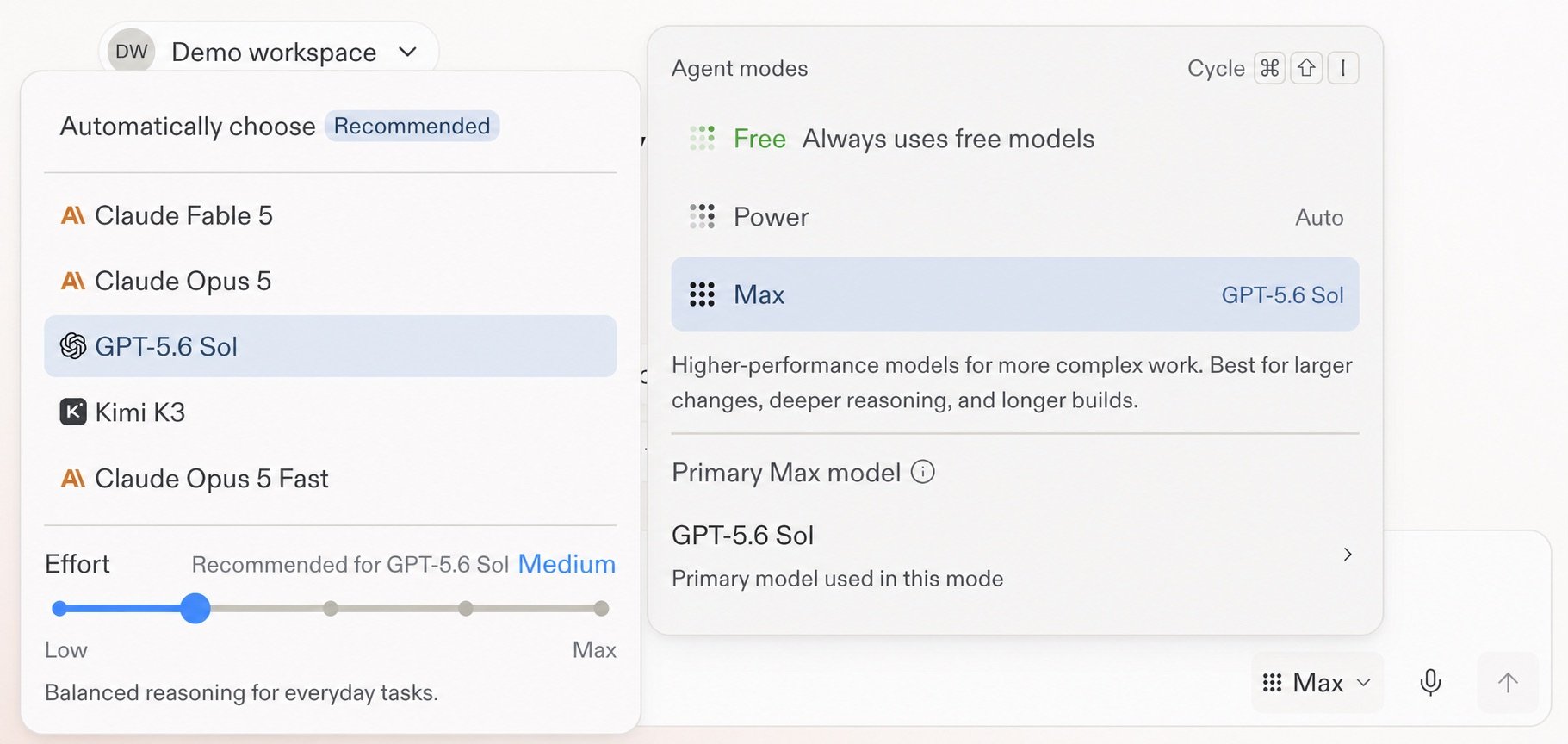
Auto lets Replit choose a model for the task. To choose one yourself, open the Agent settings dropdown in the prompt box, select **Power Mode** or **Max Mode**, turn off **Auto**, then select **Primary model**.

Free Mode always uses Auto. Builders on Core and Pro can choose an available model in Power Mode or Max Mode. The model list in Replit is the source of truth for your account because availability can vary.

<Frame caption="Model and Effort controls in the Agent settings menu.">
  <img src="https://mintcdn.com/replit/teDUL4A-lNO7dv1O/images/chat/model-selector-gpt-5-6-sol-effort.jpg?fit=max&auto=format&n=teDUL4A-lNO7dv1O&q=85&s=436704fc724eb28b23c5ec9d3a1151ba" alt="Demo workspace model selector with GPT-5.6 Sol selected in Max Mode and Effort set to Medium" width="1821" height="864" data-path="images/chat/model-selector-gpt-5-6-sol-effort.jpg" />
</Frame>

## Set Effort for the model

Effort controls how much reasoning the selected model spends on a response. It is a per-model control, not a separate mode. The supported levels run from **Low** through **Max**, and each model shows a recommended setting.

Use a higher Effort only when the task calls for deeper reasoning. Higher settings can take longer and cost more on complex work.

## Learn more

<section className="chat-mkt chat-workflow-grid has-visuals">
  <a className="chat-example has-visual" href="/features/agent/model-selector">
    <div className="chat-use-case-visual palette-ink">
      <div className="chat-use-case-window">
        <i />

        <i />

        <i />

        <b />

        <b />

        <b />
      </div>

      <em>
        <Icon icon="microchip" size={24} />
      </em>
    </div>

    <span>
      <Icon icon="microchip" size={19} />
    </span>

    <div className="chat-card-title">Model selector reference</div>
    <p>Review Auto, available models, Effort levels, and Compare models.</p>
    <div className="chat-card-link">Open the reference →</div>
  </a>

  <a className="chat-example has-visual" href="/features/agent/model-selector#effort">
    <div className="chat-use-case-visual palette-stone">
      <div className="chat-use-case-window">
        <i />

        <i />

        <i />

        <b />

        <b />

        <b />
      </div>

      <em>
        <Icon icon="gauge-high" size={24} />
      </em>
    </div>

    <span>
      <Icon icon="gauge-high" size={19} />
    </span>

    <div className="chat-card-title">Effort details</div>
    <p>Compare Low, Medium, High, Extra High, and Max.</p>
    <div className="chat-card-link">Review Effort →</div>
  </a>
</section>

Model and Effort settings shape how Replit responds. [Voice Mode](/chat/voice-mode) changes how you provide the request by letting you speak instead of type.
