> ## Documentation Index
> Fetch the complete documentation index at: https://docs.replit.com/llms.txt
> Use this file to discover all available pages before exploring further.

# Memories

> Learn how Memories can help Replit retain useful context across Conversations and Projects.

export const MemoriesCover = () => <FrostedCover label="A Replit memory document with retained workspace context">
    <span style={{
  position: "absolute",
  left: "clamp(16px, 11%, 108px)",
  top: "26%",
  width: "clamp(34px, 7vw, 56px)",
  height: "clamp(34px, 7vw, 56px)",
  border: "1px solid rgba(255,255,255,.48)",
  borderRadius: 999,
  background: "rgba(255,255,255,.15)",
  boxShadow: "0 0 22px rgba(255,255,255,.16)"
}} />
    <span style={{
  position: "absolute",
  right: "clamp(18px, 12%, 116px)",
  bottom: "clamp(19px, 11%, 48px)",
  width: "clamp(25px, 5vw, 42px)",
  height: "clamp(25px, 5vw, 42px)",
  border: "1px solid rgba(255,255,255,.42)",
  borderRadius: 999,
  background: "rgba(255,255,255,.1)"
}} />
    <div style={{
  position: "relative",
  width: "clamp(186px, 36vw, 302px)",
  minWidth: "min(60%, 270px)",
  minHeight: "clamp(160px, 27vw, 218px)",
  padding: "clamp(14px, 2.4vw, 21px)",
  border: "1px solid rgba(255,255,255,.66)",
  borderRadius: 22,
  background: "linear-gradient(145deg, rgba(255,255,255,.42), rgba(255,255,255,.12))",
  boxShadow: "0 22px 42px rgba(63,20,6,.24)",
  backdropFilter: "blur(8px)",
  boxSizing: "border-box"
}}>
      <div style={{
  display: "flex",
  alignItems: "center",
  gap: 10
}}>
        <span style={{
  width: 33,
  height: 33,
  border: "1px solid rgba(255,255,255,.62)",
  borderRadius: 11,
  background: "rgba(255,255,255,.16)"
}} />
        <div style={{
  flex: 1
}}>
          <Lines widths={["54%", "78%"]} strong={0} />
        </div>
      </div>
      <div style={{
  display: "grid",
  gap: 10,
  marginTop: "clamp(20px, 3.8vw, 32px)",
  padding: "clamp(10px, 1.8vw, 15px)",
  border: "1px solid rgba(255,255,255,.4)",
  borderRadius: 12,
  background: "rgba(255,255,255,.1)"
}}>
        <Lines widths={["84%", "62%", "74%"]} strong={0} />
      </div>
      <div style={{
  position: "absolute",
  left: "clamp(14px, 2.4vw, 21px)",
  bottom: "clamp(13px, 2.2vw, 19px)",
  display: "flex",
  gap: 5
}}>
        {[0, 1, 2].map(node => <span key={node} style={{
  width: 6,
  height: 6,
  borderRadius: 999,
  background: node === 0 ? "rgba(255,255,255,.86)" : "rgba(255,255,255,.38)"
}} />)}
      </div>
    </div>
  </FrostedCover>;

<MemoriesCover />

Memories let Replit retain useful context and adapt from past work, so you do
not need to repeat the same preferences each time. Replit can write Memories
while you work and keep them useful over time.

## Manage your Memories

<Steps>
  <Step title="Open Settings">
    Open **Settings** in Replit.
  </Step>

  <Step title="Select Customization">
    Select **Customization**.
  </Step>

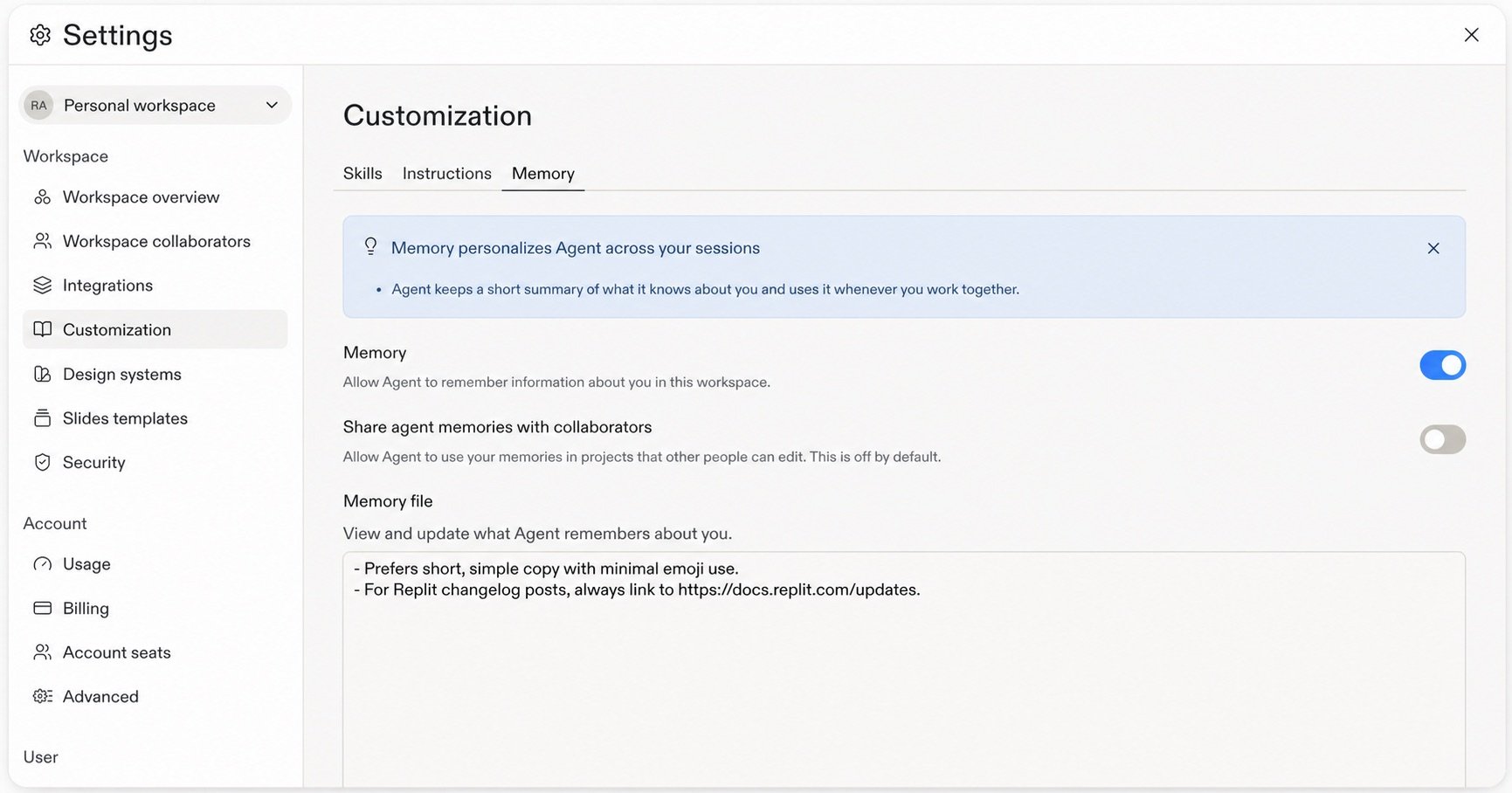
  <Step title="Open the Memory tab">
    There, you can opt in to Memory, turn it off later, choose whether to share
    with collaborators, and view or update the **Memory file**. Memories are
    private by default, and collaborator sharing is off by default.

    <Frame>
      <img src="https://mintcdn.com/replit/teDUL4A-lNO7dv1O/images/chat/memory-settings.jpg?fit=max&auto=format&n=teDUL4A-lNO7dv1O&q=85&s=ca75cd01c1b1ec4c98f4e4c6a5ec2665" alt="Settings > Customization > Memory showing the Memory toggle, optional collaborator sharing, and editable Memory file" data-og-width="1731" width="1731" data-og-height="908" height="908" data-path="images/chat/memory-settings.jpg" data-optimize="true" data-opv="3" srcset="https://mintcdn.com/replit/teDUL4A-lNO7dv1O/images/chat/memory-settings.jpg?w=280&fit=max&auto=format&n=teDUL4A-lNO7dv1O&q=85&s=c3d33b0fd51b7f40926b0deb4735268e 280w, https://mintcdn.com/replit/teDUL4A-lNO7dv1O/images/chat/memory-settings.jpg?w=560&fit=max&auto=format&n=teDUL4A-lNO7dv1O&q=85&s=939e4dc09811fe0e9c74c3a4210b62a4 560w, https://mintcdn.com/replit/teDUL4A-lNO7dv1O/images/chat/memory-settings.jpg?w=840&fit=max&auto=format&n=teDUL4A-lNO7dv1O&q=85&s=abcdd9adb0a952df42e20506761306e6 840w, https://mintcdn.com/replit/teDUL4A-lNO7dv1O/images/chat/memory-settings.jpg?w=1100&fit=max&auto=format&n=teDUL4A-lNO7dv1O&q=85&s=7d19ba2c0bc53366b02441fcff5900c6 1100w, https://mintcdn.com/replit/teDUL4A-lNO7dv1O/images/chat/memory-settings.jpg?w=1650&fit=max&auto=format&n=teDUL4A-lNO7dv1O&q=85&s=6226229c508779784ee7c86e514b564d 1650w, https://mintcdn.com/replit/teDUL4A-lNO7dv1O/images/chat/memory-settings.jpg?w=2500&fit=max&auto=format&n=teDUL4A-lNO7dv1O&q=85&s=2d841cc4eb96736bf1b6eb1c9c5dc820 2500w" />
    </Frame>
  </Step>
</Steps>

<Note>
  Memories do not retain personal or sensitive information. Replit handles
  Memory securely because it is derived from workspace activity.
</Note>

To learn when to use Memories, Custom Instructions, or Skills, see [Memories, Custom Instructions, and Skills](/chat/memories-custom-instructions-and-skills).

## FAQ

<AccordionGroup>
  <Accordion title="What can Memories retain?">
    Memories retain useful context, not executable instructions. User memory can
    capture durable workspace preferences and working style. Project memory can
    capture conventions, gotchas, and fixes. Custom memory is context you define
    with its own access and visibility settings. Your explicit request and
    [Custom Instructions](/features/agent/agent-customization) take priority
    over memory.
  </Accordion>

  <Accordion title="Does Replit retain personal information?">
    <Note>
      Memories do not retain personal information. User memory can retain useful
      workspace preferences and working style, but not sensitive traits,
      third-party personal data, credentials, or project-confidential facts.
    </Note>
  </Accordion>

  <Accordion title="Can I share my Memories with other people?">
    Memories are private by default. Sharing with collaborators is optional and
    off by default. Turn it on in **Settings → Customization → Memory** when you
    want Replit to use Memory in Projects that other collaborators can edit.
  </Accordion>

  <Accordion title="Where do Memories apply?">
    User memory belongs to one builder and workspace. Project memory stays with
    one Project and is retrieved when relevant. Custom memory follows the access
    and visibility settings defined for it. By default, Replit does not use your
    Memory in Projects that other collaborators can edit unless you turn on
    sharing with collaborators.
  </Accordion>

  <Accordion title="Can I view, edit, or turn off Memories?">
    Yes. In **Settings → Customization → Memory**, you can opt in to Memory,
    disable it later, and use the **Memory file** to view and update what Replit
    remembers.
  </Accordion>
</AccordionGroup>
