> ## Documentation Index
> Fetch the complete documentation index at: https://docs.replit.com/llms.txt
> Use this file to discover all available pages before exploring further.

# Select the right Agent Mode

> Choose Free Mode, Power Mode, or Max Mode based on the work you want to do, the capability you need, and your available allowance or credits.

<div className="chat-mkt" role="img" aria-label="Nine-dot mode selector representing Agent Modes" style={{ margin: "28px 0 42px", borderTop: 0, paddingTop: 0 }}>
  <div className="chat-use-case-visual" style={{ aspectRatio: "auto", minHeight: "clamp(220px, 34vw, 320px)" }}>
    <div
      aria-hidden="true"
      style={{
    position: "relative",
    zIndex: 1,
    display: "flex",
    alignItems: "center",
    justifyContent: "center",
    gap: "clamp(18px, 4vw, 28px)",
    color: "#fff",
    filter: "drop-shadow(0 8px 18px rgba(73,18,0,.42))",
  }}
    >
      <svg
        width="96"
        height="96"
        viewBox="0 0 18 18"
        fill="none"
        dangerouslySetInnerHTML={{
      __html:
        '<circle cx="3.724" cy="3.724" r="1.75" fill="currentColor" opacity="0.55"></circle><circle cx="9.004" cy="3.724" r="1.75" fill="currentColor" opacity="1"></circle><circle cx="14.285" cy="3.724" r="1.75" fill="currentColor" opacity="1"></circle><circle cx="3.724" cy="9.004" r="1.75" fill="currentColor" opacity="0.2"></circle><circle cx="9.004" cy="9.004" r="1.75" fill="currentColor" opacity="0.55"></circle><circle cx="14.285" cy="9.004" r="1.75" fill="currentColor" opacity="1"></circle><circle cx="3.724" cy="14.285" r="1.75" fill="currentColor" opacity="0.2"></circle><circle cx="9.004" cy="14.285" r="1.75" fill="currentColor" opacity="0.2"></circle><circle cx="14.285" cy="14.285" r="1.75" fill="currentColor" opacity="0.55"></circle>',
    }}
      />

      <span
        style={{
      fontSize: "clamp(34px, 7vw, 58px)",
      fontWeight: 600,
      letterSpacing: "-0.03em",
      lineHeight: 1,
    }}
      >
        Agent Modes
      </span>
    </div>
  </div>
</div>

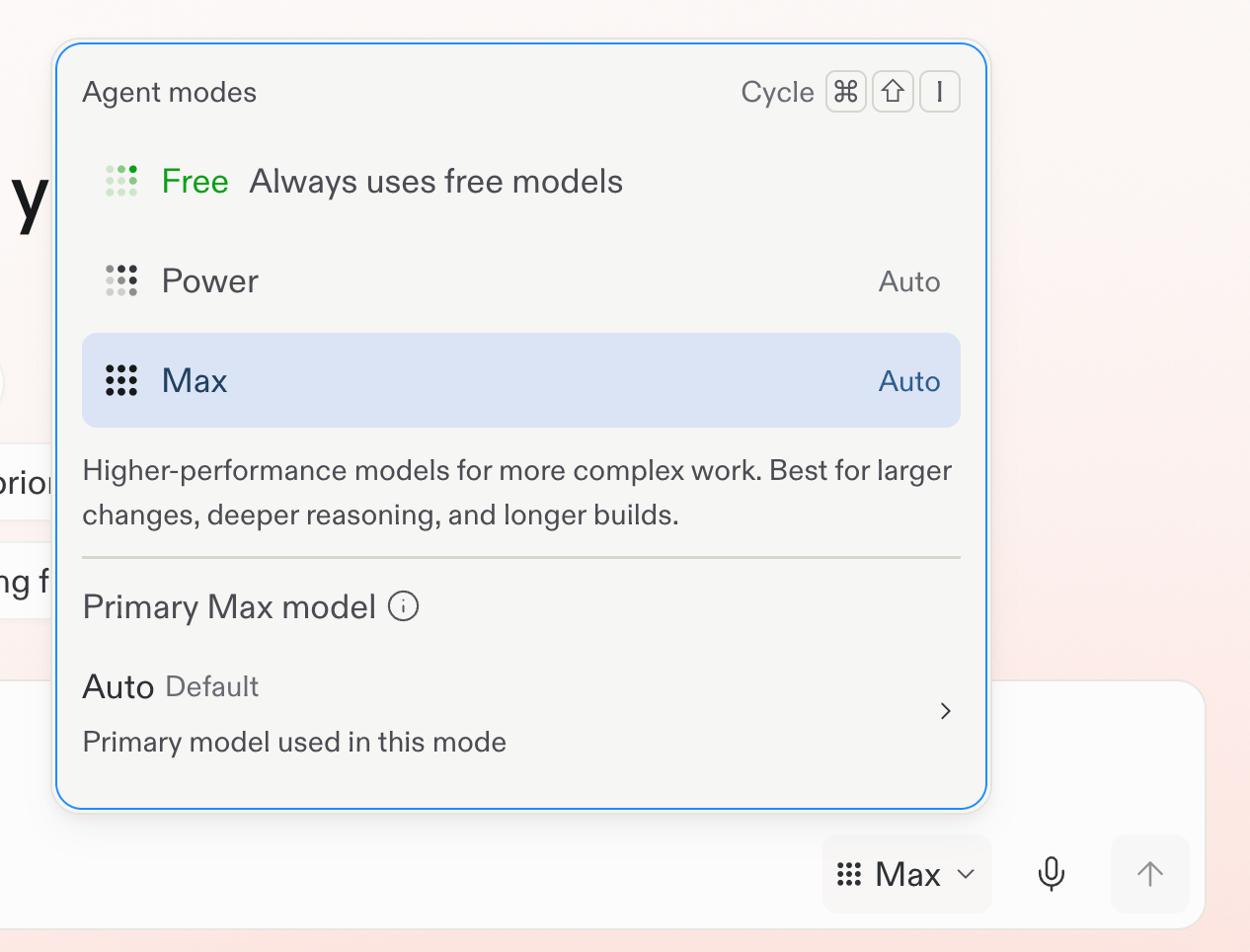
Agent Modes let you choose the balance between included allowance, credits, and capability before you send a request. Open the Agent settings dropdown in the prompt box, then select the mode that fits the work.

<Note>
  Economy Mode is no longer available. Power Mode replaces it at the same price.
</Note>

<Frame caption="Choose Free Mode from the mode selector.">
  <img src="https://mintcdn.com/replit/teDUL4A-lNO7dv1O/images/chat/agent-modes-selector.png?fit=max&auto=format&n=teDUL4A-lNO7dv1O&q=85&s=01b29cf86c7ba82e431790bc6746cc72" alt="Mode selector with Free selected" width="1266" height="964" data-path="images/chat/agent-modes-selector.png" />
</Frame>

## Choose a mode

* **Free Mode:** Available on Core and Pro plans. Use your allowance to explore ideas, ask questions, start building, and keep everyday work moving. The allowance refreshes every {FreeModeAllowanceRefreshPeriod}, and Free Mode uses Auto to select the model.
* **Power Mode:** A smart balance of speed and capability for most work. Use it when you need more than your Free Mode allowance or want a stronger default for an existing project.
* **Max Mode:** The most capable option for complex, ambitious work, larger codebases, and harder problems.

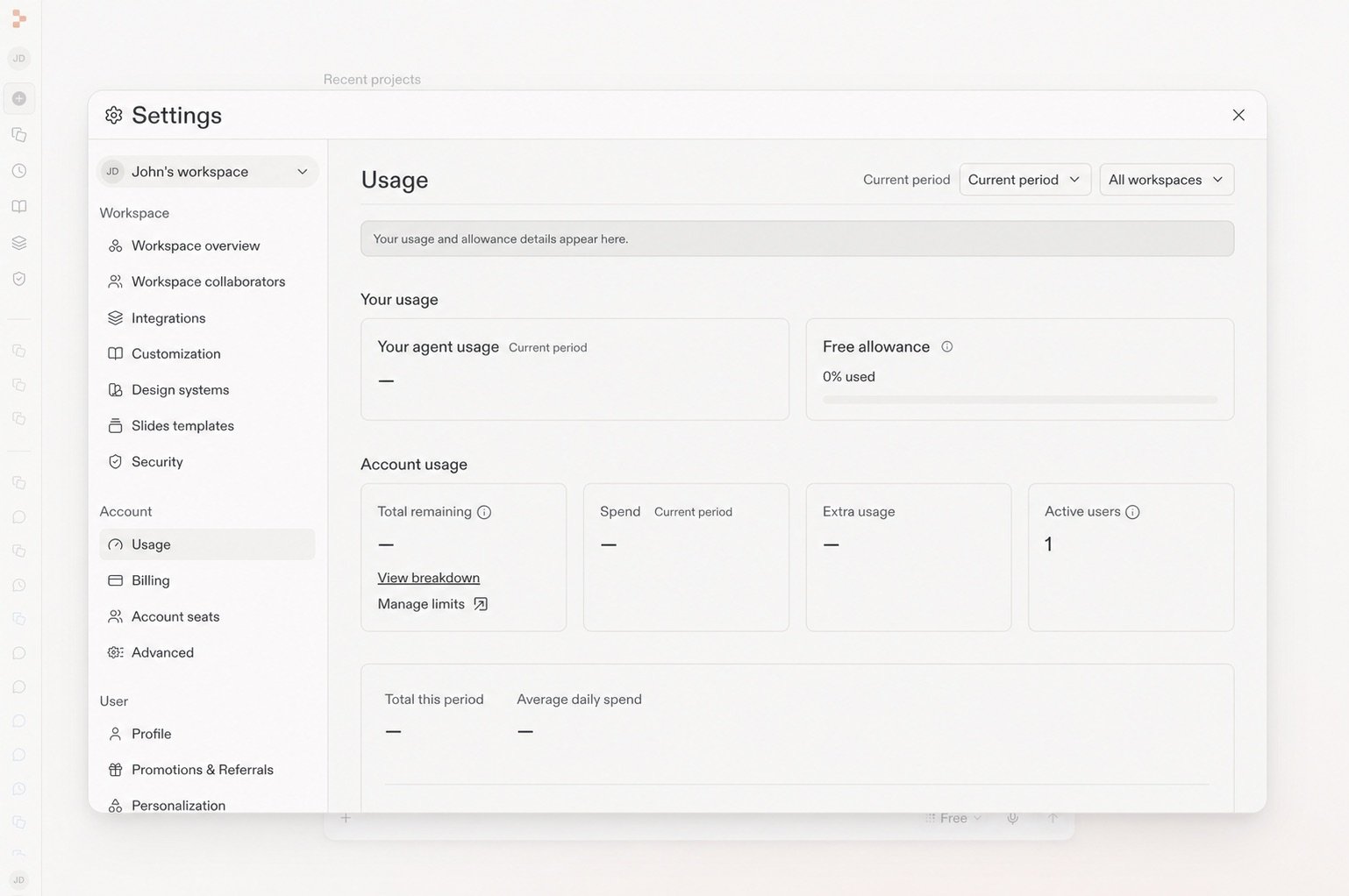
Power Mode and Max Mode use monthly credits. Replit lets you know before a request shifts from Free Mode to a mode that incurs usage costs. Check your remaining Free Mode allowance in **Settings** → **Usage**. For practical tips, see [Get the most out of Free Mode](/chat/free-mode).

Routines run in Power or Max Mode and require a per-run budget. They cannot run in Free Mode. Learn more about [Routines](/chat/routines).

## Learn more

<section className="chat-mkt chat-workflow-grid has-visuals">
  <a className="chat-example has-visual" href="/features/agent/agent-modes">
    <div className="chat-use-case-visual palette-ink">
      <div className="chat-use-case-window">
        <i />

        <i />

        <i />

        <b />

        <b />

        <b />
      </div>

      <em>
        <Icon icon="bolt" size={24} />
      </em>
    </div>

    <span>
      <Icon icon="bolt" size={19} />
    </span>

    <div className="chat-card-title">Agent Modes reference</div>
    <p>Compare Free Mode, Power Mode, and Max Mode in detail.</p>
    <div className="chat-card-link">Open the reference →</div>
  </a>

  <a className="chat-example has-visual" href="/chat/free-mode">
    <div className="chat-use-case-visual">
      <div
        aria-hidden="true"
        style={{
      position: "relative",
      zIndex: 1,
      display: "flex",
      alignItems: "center",
      justifyContent: "center",
      gap: "clamp(12px, 3vw, 18px)",
      color: "#fff",
      filter: "drop-shadow(0 8px 18px rgba(73,18,0,.42))",
    }}
      >
        <svg
          width="48"
          height="48"
          viewBox="0 0 18 18"
          fill="none"
          dangerouslySetInnerHTML={{
        __html:
          '<circle cx="3.724" cy="3.724" r="1.75" fill="currentColor" opacity="0.55"></circle><circle cx="9.004" cy="3.724" r="1.75" fill="currentColor" opacity="1"></circle><circle cx="14.285" cy="3.724" r="1.75" fill="currentColor" opacity="1"></circle><circle cx="3.724" cy="9.004" r="1.75" fill="currentColor" opacity="0.2"></circle><circle cx="9.004" cy="9.004" r="1.75" fill="currentColor" opacity="0.55"></circle><circle cx="14.285" cy="9.004" r="1.75" fill="currentColor" opacity="1"></circle><circle cx="3.724" cy="14.285" r="1.75" fill="currentColor" opacity="0.2"></circle><circle cx="9.004" cy="14.285" r="1.75" fill="currentColor" opacity="0.2"></circle><circle cx="14.285" cy="14.285" r="1.75" fill="currentColor" opacity="0.55"></circle>',
      }}
        />

        <span
          style={{
        fontSize: "clamp(22px, 3vw, 30px)",
        fontWeight: 600,
        letterSpacing: "-0.03em",
        lineHeight: 1,
      }}
        >
          Free Mode
        </span>
      </div>
    </div>

    <span>
      <Icon icon="seedling" size={19} />
    </span>

    <div className="chat-card-title">Get the most out of Free Mode</div>

    <p>
      Use your included allowance for everyday chat, creation, and building.
    </p>

    <div className="chat-card-link">Continue →</div>
  </a>
</section>

## Check your allowance

Open **Settings** → **Usage** to see how much of your Free Mode allowance remains and when it will refresh. For practical tips, see [Get the most out of Free Mode](/chat/free-mode).

<Frame caption="The Usage page shows your remaining Free allowance.">
  <img src="https://mintcdn.com/replit/teDUL4A-lNO7dv1O/images/chat/free-mode-usage-sanitized.jpg?fit=max&auto=format&n=teDUL4A-lNO7dv1O&q=85&s=d0538032632b4201a99f555f47999333" alt="Settings Usage page with the Free allowance panel visible" width="1538" height="1022" data-path="images/chat/free-mode-usage-sanitized.jpg" />
</Frame>
