> ## Documentation Index
> Fetch the complete documentation index at: https://docs.replit.com/llms.txt
> Use this file to discover all available pages before exploring further.
# Submit to the App Store
> Complete the App Store listing and send PixelGames for Apple's review.
Your build should already be in App Store Connect, see
[upload your app](/build/mobile-upload-ios) if it isn't. What's left is the listing Apple
shows to players, and the review itself.
## 1. Complete the App Store listing
In App Store Connect: screenshots for each device size, a description, keywords, and an
age rating questionnaire. See [generate an app icon](/build/mobile-app-icon) and
[generate App Store screenshots](/build/mobile-store-screenshots) if you need these.
Apple's App Privacy section asks exactly what data PixelGames collects, accounts,
location, photos, and how it's used. Answer this accurately, mismatches are a common
rejection reason.
## 2. Submit for review
With the listing complete, select **Add for Review** at the top right of the version page.
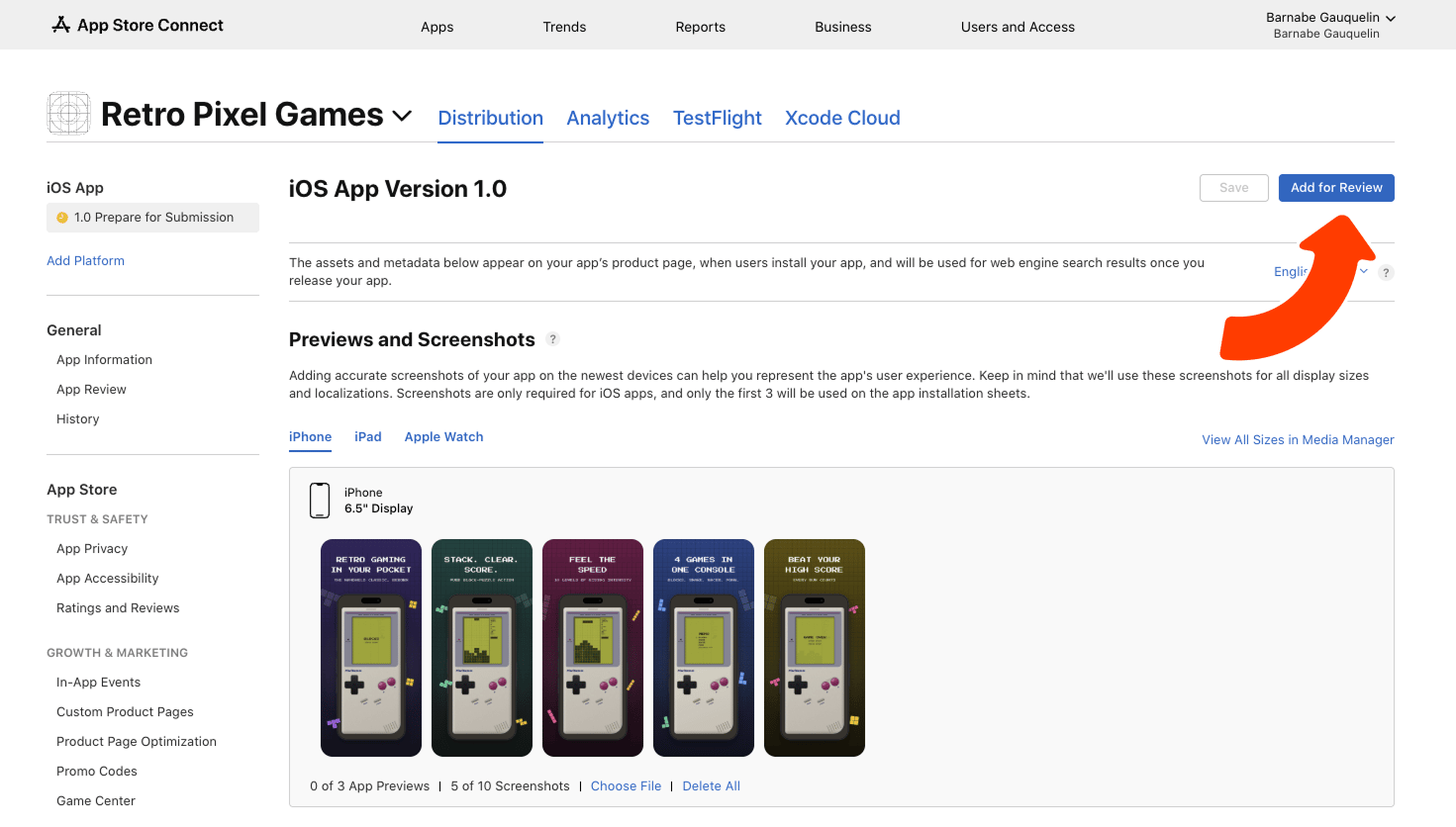 Every submission goes through Apple's review before it reaches the App Store. It's often a day
or two, and sometimes longer, especially the first time you submit a new app.
If it's rejected, Apple sends notes explaining what to fix. Paste those into Agent, fix the
smallest issue that caused it, and resubmit, rejections are common and you can resubmit right
away.
## Troubleshooting
* **Rejected by Apple:** paste the reviewer's notes into Agent and ask it to fix the smallest
issue that caused it.
* **Stuck in review:** review times aren't fixed. Check App Store Connect for the current
status rather than resubmitting.
* **Privacy details mismatch:** if a feature was added after the listing was filled in (a new
permission, a new data type collected), update the privacy section before resubmitting.
## What's next
Do the same for Android players.
Prompt happy players to rate PixelGames.
## Related
* [Upload your app](/build/mobile-upload-ios)
* [Beta test with TestFlight](/build/mobile-testflight)
Every submission goes through Apple's review before it reaches the App Store. It's often a day
or two, and sometimes longer, especially the first time you submit a new app.
If it's rejected, Apple sends notes explaining what to fix. Paste those into Agent, fix the
smallest issue that caused it, and resubmit, rejections are common and you can resubmit right
away.
## Troubleshooting
* **Rejected by Apple:** paste the reviewer's notes into Agent and ask it to fix the smallest
issue that caused it.
* **Stuck in review:** review times aren't fixed. Check App Store Connect for the current
status rather than resubmitting.
* **Privacy details mismatch:** if a feature was added after the listing was filled in (a new
permission, a new data type collected), update the privacy section before resubmitting.
## What's next
Do the same for Android players.
Prompt happy players to rate PixelGames.
## Related
* [Upload your app](/build/mobile-upload-ios)
* [Beta test with TestFlight](/build/mobile-testflight)