> ## Documentation Index
> Fetch the complete documentation index at: https://docs.replit.com/llms.txt
> Use this file to discover all available pages before exploring further.
# Turn a Claude design into an app
> Send a design from Claude to Replit, create a project from the static HTML, and let Agent turn it into an interactive app.
export const platform_0 = "Claude"
export const projectType_0 = "project"
export const setupDescription_0 = "Agent converts your static design into an interactive app and configures it to run on Replit"
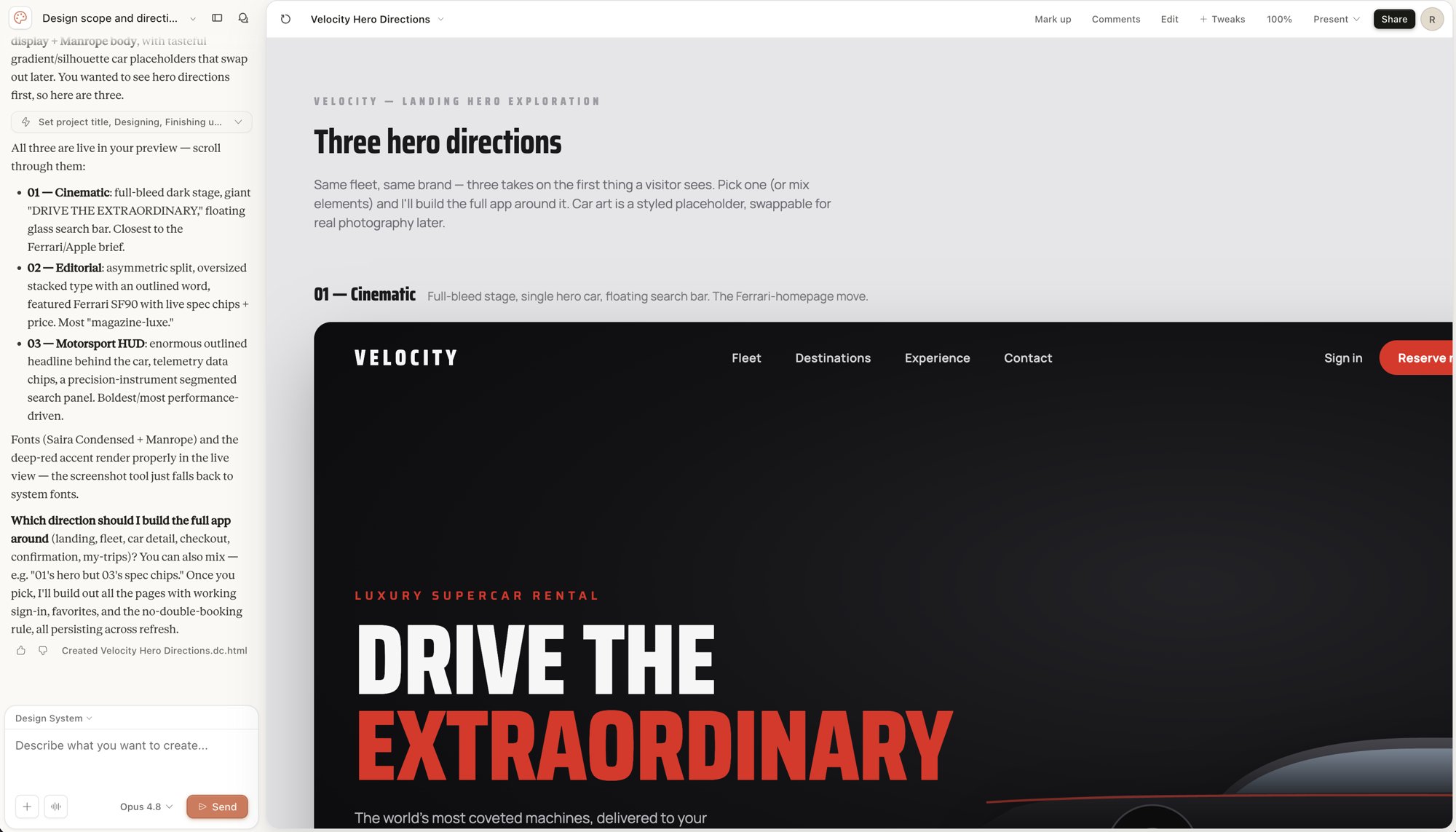
A design built in Claude shows what an experience should look like. With Claude's **Send to Replit** option, you can hand that design off to Replit, where it becomes a project and Agent turns it into a working, interactive app.
This is a new integration. **Send to Replit** appears in Claude's **Send to…** menu only when Claude offers Replit as a destination for your design. Availability is controlled by Claude, so the option may not show for every account yet. When you accept the handoff, Claude requests the **Access apps**, **Create and manage apps**, and **Stay signed in to this application** scopes on the Replit consent screen.
 ## How it works
The handoff starts in Claude and finishes in Replit:
1. You build a self-contained design in Claude's design canvas.
2. You send the design to Replit from Claude's **Share → Send to…** menu.
3. You authorize Claude to access your Replit account and choose a workspace.
4. Replit creates a project with your design as a static `index.html` file.
5. Agent picks up a **Turn this Claude design into a real app** task and makes it interactive.
This is Claude *sending* a design to Replit through an authorized app connection. You do not configure anything in Replit first — the flow begins from Claude.
## Before you start
You need:
* A [Replit account](https://replit.com).
* A Claude account with a design in Claude's design canvas.
* A target Replit workspace for the new project.
## Send a design from Claude to Replit
Start in Claude with the design you want to build on.
In Claude, open the design you want to turn into an app.
Select **Share**, then open the **Send to…** menu. Replit appears as a destination.
## How it works
The handoff starts in Claude and finishes in Replit:
1. You build a self-contained design in Claude's design canvas.
2. You send the design to Replit from Claude's **Share → Send to…** menu.
3. You authorize Claude to access your Replit account and choose a workspace.
4. Replit creates a project with your design as a static `index.html` file.
5. Agent picks up a **Turn this Claude design into a real app** task and makes it interactive.
This is Claude *sending* a design to Replit through an authorized app connection. You do not configure anything in Replit first — the flow begins from Claude.
## Before you start
You need:
* A [Replit account](https://replit.com).
* A Claude account with a design in Claude's design canvas.
* A target Replit workspace for the new project.
## Send a design from Claude to Replit
Start in Claude with the design you want to build on.
In Claude, open the design you want to turn into an app.
Select **Share**, then open the **Send to…** menu. Replit appears as a destination.
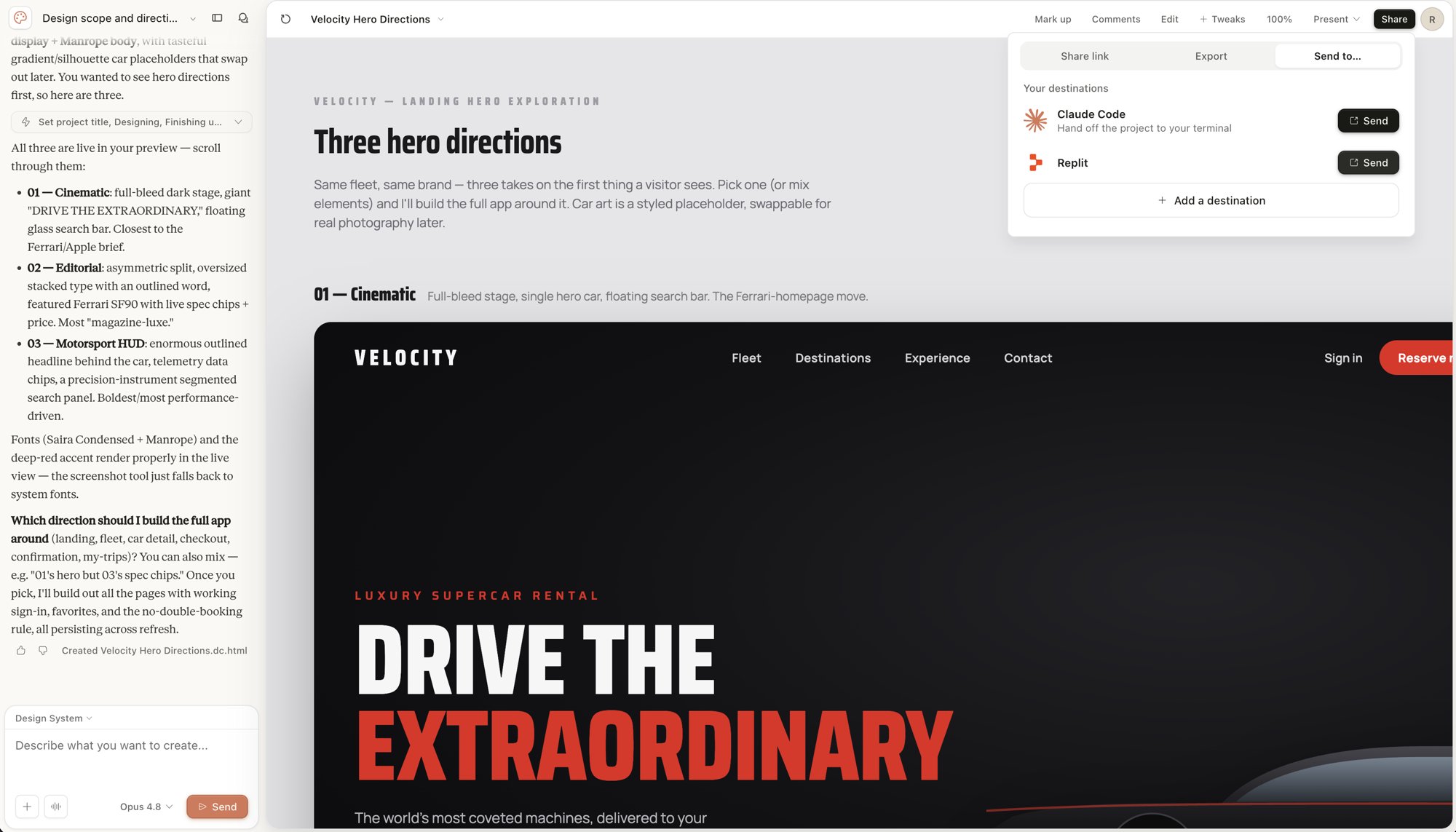 Select **Replit** to start the handoff to your Replit account.
On the Replit consent screen titled **Claude would like to access your Replit account**, review the access Claude requests — **Access apps**, **Create and manage apps**, and **Stay signed in to this application** — then authorize the connection.
Select **Replit** to start the handoff to your Replit account.
On the Replit consent screen titled **Claude would like to access your Replit account**, review the access Claude requests — **Access apps**, **Create and manage apps**, and **Stay signed in to this application** — then authorize the connection.
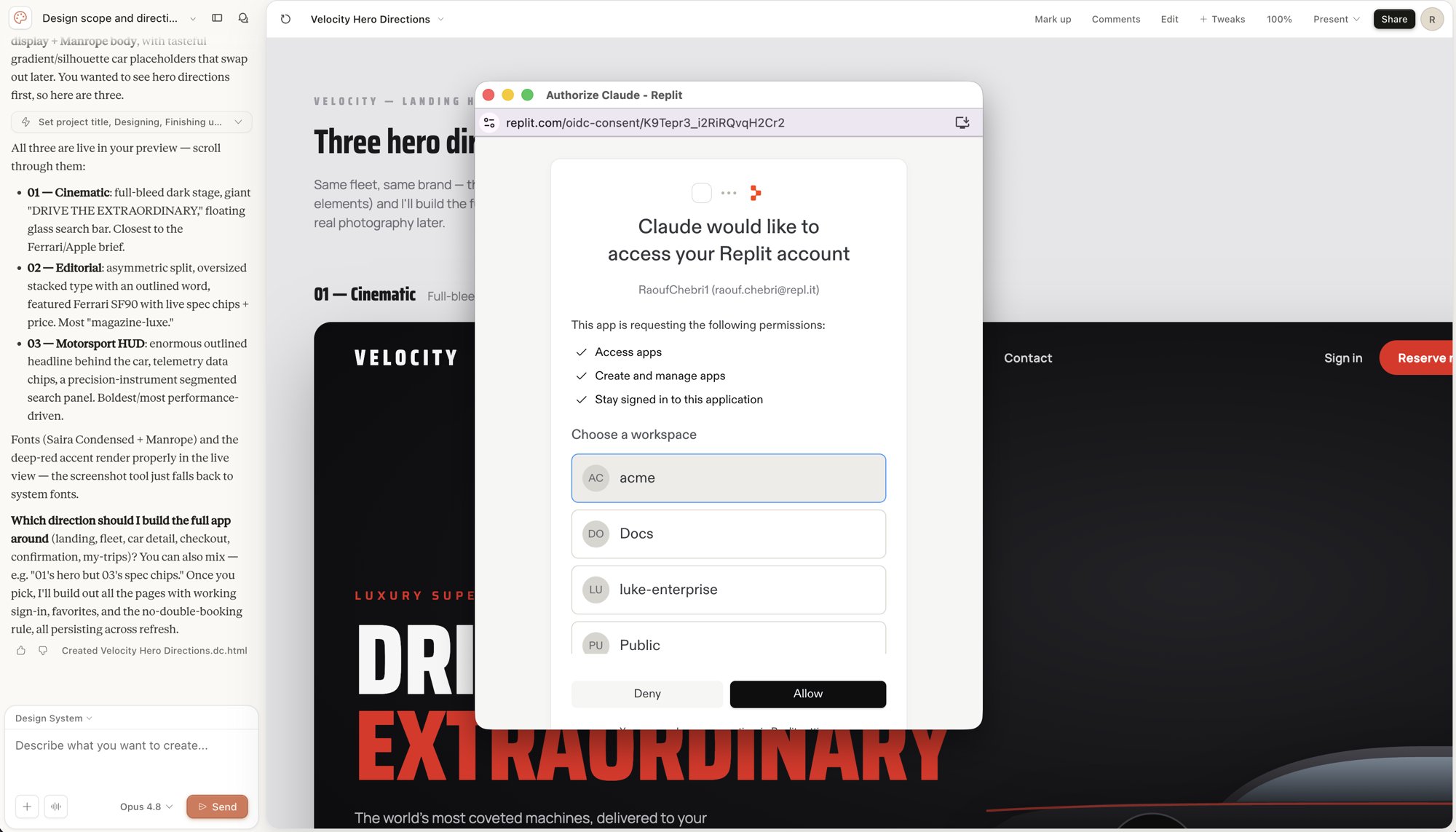 Pick the Replit workspace where you want the new project created, then confirm.
After you confirm, Replit creates a project from your design and opens it in the workspace.
## What gets imported
Replit imports the design as a single, self-contained `index.html` file. The import preserves the visual layout, styling, and assets that Claude included in the design.
The import gives you a working starting point. Because the design arrives as static HTML, you still add behavior, data, and interactivity after import.
## What is not imported
The handoff carries the design, not a full application. The following are not part of the import:
* Backend logic and server-side functionality.
* A database or stored data.
* Interactivity such as working forms, state, and navigation.
Agent adds this functionality when it turns the design into a real app.
## Let Agent make the design interactive
After import, Agent starts a **Turn this Claude design into a real app** task in the workspace. Agent works from your static design and builds the interactive behavior the design implies.
Pick the Replit workspace where you want the new project created, then confirm.
After you confirm, Replit creates a project from your design and opens it in the workspace.
## What gets imported
Replit imports the design as a single, self-contained `index.html` file. The import preserves the visual layout, styling, and assets that Claude included in the design.
The import gives you a working starting point. Because the design arrives as static HTML, you still add behavior, data, and interactivity after import.
## What is not imported
The handoff carries the design, not a full application. The following are not part of the import:
* Backend logic and server-side functionality.
* A database or stored data.
* Interactivity such as working forms, state, and navigation.
Agent adds this functionality when it turns the design into a real app.
## Let Agent make the design interactive
After import, Agent starts a **Turn this Claude design into a real app** task in the workspace. Agent works from your static design and builds the interactive behavior the design implies.
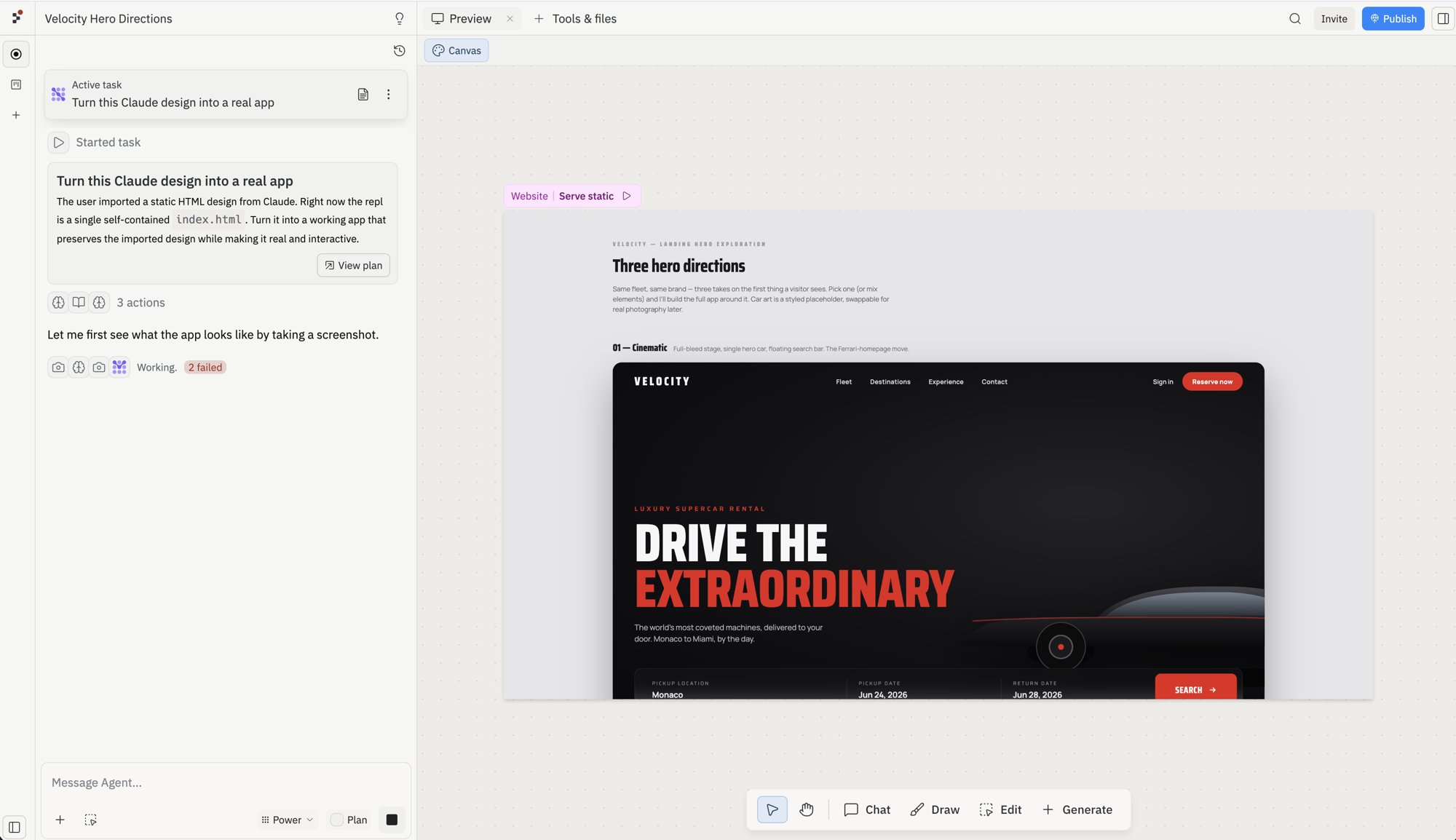 Open Preview when the task finishes to test the result. Compare the running app to your original Claude design and confirm:
* The layout and styling match the design closely enough.
* Buttons, forms, and navigation work as expected.
* The app still works after a refresh.
If something is missing or off, describe the change to Agent and let it refine the app.
## Configure and run your app
During import, {setupDescription_0}. If your app needs changes, use these Project Editor tools:
* **[Agent](/references/agent/overview)**: Refine features, debug issues, and make code changes
* **[Secrets](/core-concepts/project-editor/app-setup/secrets)**: Add API keys and environment variables
* **[Workflows](/references/workspace-tools/workflows)**: Set the **Run** command for your app
## Continue your journey
Now that you've imported your {platform_0} {projectType_0}, explore these next steps:
* [Replit Agent](/references/agent/overview): Get help with feature work, debugging, and refactoring
* [Replit Deployments](/learn/projects-and-artifacts/replit-deployments): Publish your app
* [Collaborate](/build/invite-teammates): Build with teammates
## Billing
Turning a design into a working app uses Agent, which can consume credits. Credit usage depends on how much Agent builds on top of the imported design.
## Related
* [Import from a provider](/build/import-from-providers)
* [Turn a Figma design into an interactive app](/build/figma-to-app)
Open Preview when the task finishes to test the result. Compare the running app to your original Claude design and confirm:
* The layout and styling match the design closely enough.
* Buttons, forms, and navigation work as expected.
* The app still works after a refresh.
If something is missing or off, describe the change to Agent and let it refine the app.
## Configure and run your app
During import, {setupDescription_0}. If your app needs changes, use these Project Editor tools:
* **[Agent](/references/agent/overview)**: Refine features, debug issues, and make code changes
* **[Secrets](/core-concepts/project-editor/app-setup/secrets)**: Add API keys and environment variables
* **[Workflows](/references/workspace-tools/workflows)**: Set the **Run** command for your app
## Continue your journey
Now that you've imported your {platform_0} {projectType_0}, explore these next steps:
* [Replit Agent](/references/agent/overview): Get help with feature work, debugging, and refactoring
* [Replit Deployments](/learn/projects-and-artifacts/replit-deployments): Publish your app
* [Collaborate](/build/invite-teammates): Build with teammates
## Billing
Turning a design into a working app uses Agent, which can consume credits. Credit usage depends on how much Agent builds on top of the imported design.
## Related
* [Import from a provider](/build/import-from-providers)
* [Turn a Figma design into an interactive app](/build/figma-to-app)