> ## Documentation Index
> Fetch the complete documentation index at: https://docs.replit.com/llms.txt
> Use this file to discover all available pages before exploring further.
# Publishing costs
> Flexible publishing costs that scale with your app's needs. Pay only for what you use with transparent, credit-based billing.
export const AiPrompt = ({children}) => {
return
{children}
;
};
export const StaticDeploymentOutboundPerGiB = '$0.10';
export const DedicatedLargeVm = '$160.00';
export const DedicatedMediumVm = '$80.00';
export const DedicatedSmallVm = '$40.00';
export const SharedMediumVm = '$20.00';
export const ScheduledDeployment = '$1.00';
export const SchedulerPrice = '$0.00';
export const ScheduledComputeUnit = '$3.20';
export const AutoscaleDeployment = '$1.00';
export const AutoscaleRequests = '$1.20';
export const AutoscaleComputeUnit = '$3.20';
export const AutoscaleBaseFee = '$1';
Replit's publishing costs are designed to scale with your app's needs. Choose from usage-based billing that charges only when your app serves requests, or predictable flat-rate options for consistent workloads.
## How billing works
All publishing costs are deducted from your monthly credits. You only pay usage-based fees after your monthly credits are fully used.
* **Starter Plan**: Includes 1 free published app. The deployment expires after 30 days but can be re-published. See [Starter Plan](/billing/plans/starter-plan) for details.
* **[Core Plan](/billing/plans/replit-core)**: Monthly credits included; see [pricing](https://replit.com/pricing)
* **[Pro Plan](/billing/plans/replit-pro)**: Tiered monthly credits; see [Replit Pro](/billing/plans/replit-pro) and the [pricing page](https://replit.com/pricing) for details
Credits apply automatically to all publishing costs. Unused credits don't roll
over to the next month. Learn more about [usage-based
billing](/billing/about-usage-based-billing).
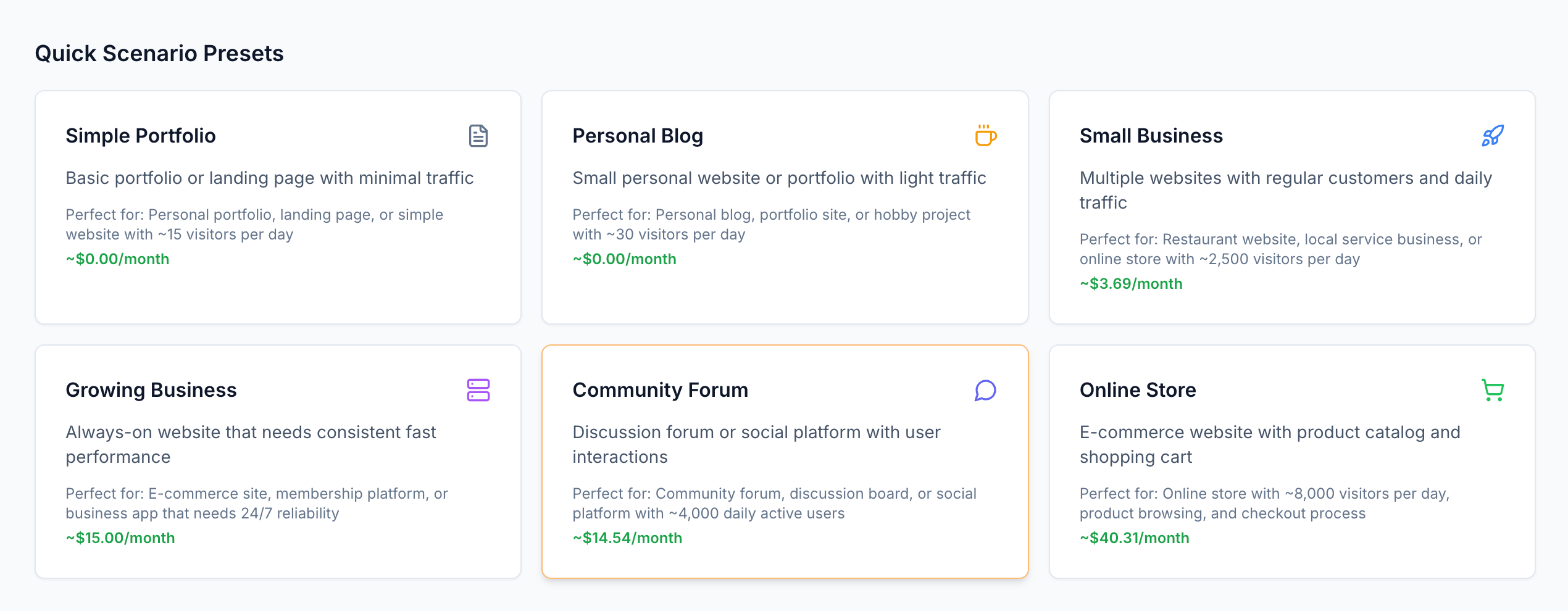
For a hands-on understanding of publishing costs, explore our [interactive pricing calculator](https://deployment-pricing.replit.app/).
 ## Deployment types
Choose the deployment type that best fits your app's traffic patterns and resource needs.
Perfect for apps with variable traffic. Pay only when your app serves requests—nothing when idle.
**Best for:** Web apps, APIs, and services with unpredictable traffic patterns
[Learn more about Autoscale Deployments](/references/publishing/autoscale-deployments)
**Predictable monthly costs with dedicated resources**
Guaranteed compute resources that run continuously. Choose shared or dedicated VMs based on your performance needs.
**Best for:** Production apps with steady traffic or guaranteed resource requirements
[Learn more about Reserved VM Deployments](/references/publishing/reserved-vm-deployments)
**Cost-effective for background tasks and automation**
Run code on a schedule without maintaining persistent infrastructure.
**Best for:** Background jobs, data processing, and automated tasks
[Learn more about Scheduled Deployments](/references/publishing/scheduled-deployments)
**Minimal costs for static content with global distribution**
Publish static sites with CDN distribution and pay only for data transfer.
**Best for:** Documentation sites, portfolios, and single-page applications
[Learn more about Static Deployments](/references/publishing/static-deployments)
## Understanding request-based billing
With Autoscale Deployments, you only pay when your app is actively working.
When no one visits your app, you pay nothing.
Autoscale Deployments use request-based billing—you're charged only when your app serves traffic. Here's how it works:
1. **App starts up** when the first request arrives (if idle)
2. **Processes the request** using compute resources
3. **Goes idle** after 15 minutes of inactivity
**Billing time:** Often just 1-2 seconds per request, even for complex apps.
### Request-based Billing Timeline
When no one visits your app, you pay nothing. When your app is busy, you pay for the compute resources used.
Here's a timeline of what happens when someone visits your app:
## Deployment types
Choose the deployment type that best fits your app's traffic patterns and resource needs.
Perfect for apps with variable traffic. Pay only when your app serves requests—nothing when idle.
**Best for:** Web apps, APIs, and services with unpredictable traffic patterns
[Learn more about Autoscale Deployments](/references/publishing/autoscale-deployments)
**Predictable monthly costs with dedicated resources**
Guaranteed compute resources that run continuously. Choose shared or dedicated VMs based on your performance needs.
**Best for:** Production apps with steady traffic or guaranteed resource requirements
[Learn more about Reserved VM Deployments](/references/publishing/reserved-vm-deployments)
**Cost-effective for background tasks and automation**
Run code on a schedule without maintaining persistent infrastructure.
**Best for:** Background jobs, data processing, and automated tasks
[Learn more about Scheduled Deployments](/references/publishing/scheduled-deployments)
**Minimal costs for static content with global distribution**
Publish static sites with CDN distribution and pay only for data transfer.
**Best for:** Documentation sites, portfolios, and single-page applications
[Learn more about Static Deployments](/references/publishing/static-deployments)
## Understanding request-based billing
With Autoscale Deployments, you only pay when your app is actively working.
When no one visits your app, you pay nothing.
Autoscale Deployments use request-based billing—you're charged only when your app serves traffic. Here's how it works:
1. **App starts up** when the first request arrives (if idle)
2. **Processes the request** using compute resources
3. **Goes idle** after 15 minutes of inactivity
**Billing time:** Often just 1-2 seconds per request, even for complex apps.
### Request-based Billing Timeline
When no one visits your app, you pay nothing. When your app is busy, you pay for the compute resources used.
Here's a timeline of what happens when someone visits your app:
Request-based Billing Timeline
Instance
Requests
Billable
First, the server starts up. Then, it processes the requests. Finally, it goes idle. You only pay for CPU and memory during request processing.
When multiple requests arrive simultaneously (like the stacked blue bars), they share the same compute resources.
Your billing time extends to cover all concurrent requests, but you don't pay separately for each—just for the total time the server is working.
The gaps between green bars represent cost savings during idle time. At the end of the session, the server shuts down.
### Compute units explained
Compute units measure the computational work your app performs:
* **CPU time**: Processing power used (1 CPU second = 18 compute units)
* **Memory time**: RAM consumed (1 GB-second = 2 compute units)
* **Duration**: How long your app works on each request
## Pricing breakdown
Pay only when your app serves requests. Automatically scales based on demand.
| Component | Price |
| :------------------------------------ | ---------------------: |
| **Base fee** (per month) | {AutoscaleBaseFee} |
| **Compute units** (per million units) | {AutoscaleComputeUnit} |
| **Requests** (per million requests) | {AutoscaleRequests} |
Execute background tasks and scheduled jobs.
| Component | Price |
| :------------------------------------ | ---------------------: |
| **Base fee** (per month) | {ScheduledDeployment} |
| **Compute units** (per million units) | {ScheduledComputeUnit} |
| **Scheduler** | {SchedulerPrice} |
Dedicated compute resources with predictable monthly costs.
#### Shared VMs
| Configuration | Price (per month) |
| :------------ | ----------------: |
\| **0.5 vCPU / 2GB RAM** | {SharedMediumVm} |
#### Dedicated VMs
| Configuration | Price (per month) |
| :-------------------- | ------------------: |
| **1 vCPU / 4GB RAM** | {DedicatedSmallVm} |
| **2 vCPU / 8GB RAM** | {DedicatedMediumVm} |
| **4 vCPU / 16GB RAM** | {DedicatedLargeVm} |
Host static sites with global CDN distribution.
| Component | Price |
| :------------------------- | -------------------------------: |
| **Hosting** | Free |
| **Data transfer** (per GB) | {StaticDeploymentOutboundPerGiB} |
## Cost examples by app type
These examples show realistic costs for different types of applications.
**Traffic:** 50 visitors/day, 3 page views each = 4,500 requests/month
| Component | Usage | Cost |
| :---------------- | :----------- | -----------------: |
| **Base fee** | Monthly | {AutoscaleBaseFee} |
| **Compute units** | 13,500 units | \~\$0.04 |
| **Requests** | 4,500 | \~\$0.01 |
| **Total** | | **\~\$1.05** |
**Traffic:** 500 visitors/day, 5 page views each = 75,000 requests/month
| Component | Usage | Cost |
| :---------------- | :------------ | -----------------: |
| **Base fee** | Monthly | {AutoscaleBaseFee} |
| **Compute units** | 600,000 units | \~\$1.92 |
| **Requests** | 75,000 | \~\$0.15 |
| **Total** | | **\~\$3.07** |
**Traffic:** 10,000 API calls/day = 300,000 requests/month
| Component | Usage | Cost |
| :---------------- | :---------- | -----------------: |
| **Base fee** | Monthly | {AutoscaleBaseFee} |
| **Compute units** | 3.96M units | \~\$12.67 |
| **Requests** | 300,000 | \~\$0.60 |
| **Total** | | **\~\$14.27** |
**Usage:** Daily data processing with Scheduled Deployments
| Component | Usage | Cost |
| :----------------------- | :----------- | --------------------: |
| **Scheduled deployment** | Base fee | {ScheduledDeployment} |
| **Compute units** | 50,000 units | \~\$0.16 |
| **Total** | | **\~\$1.16** |
## Monitor and control costs
Configure spending limits and budgets to prevent unexpected charges.
Track real-time consumption and costs in your Usage dashboard.
Understand how [Agent](/references/agent/overview) affects your bill.
View logs, track performance, and monitor published app status.